[Skip to main content](https://help.trackvia.com/hc/en-us/articles/8780738310427#main-content)
# oops
## The page you were looking for doesn't exist
You may have mistyped the address or the page may have moved
[Take me back to the home page](https://help.trackvia.com/hc/en-us "Home")
[Powered by Zendesk](https://www.zendesk.com/service/help-center/?utm_source=helpcenter&utm_medium=poweredbyzendesk&utm_campaign=text&utm_content=TrackVia)
[iframe](https://td.doubleclick.net/td/ga/rul?tid=G-XMMWW2S2NC&gacid=207538025.1743445438>m=45je53r0v887411077za200&dma=0&gcd=13l3l3l3l1l1&npa=0&pscdl=noapi&aip=1&fledge=1&frm=0&tag_exp=102482433~102788824~102803279~102813109~102887799~102926062~102975949&z=1226144937)
---
[Skip to main content](https://help.trackvia.com/hc/en-us/articles/8110103388187#main-content)
# oops
## The page you were looking for doesn't exist
You may have mistyped the address or the page may have moved
[Take me back to the home page](https://help.trackvia.com/hc/en-us "Home")
[Powered by Zendesk](https://www.zendesk.com/service/help-center/?utm_source=helpcenter&utm_medium=poweredbyzendesk&utm_campaign=text&utm_content=TrackVia)
[iframe](https://td.doubleclick.net/td/ga/rul?tid=G-XMMWW2S2NC&gacid=1973832310.1743444198>m=45je53r0h1v887411077za200zb9136995142&dma=0&gcd=13l3l3l3l1l1&npa=0&pscdl=noapi&aip=1&fledge=1&frm=0&tag_exp=102482433~102509683~102788824~102803279~102813109~102887800~102926062&z=1991766101)
---
[Skip to main content](https://help.trackvia.com/hc/en-us/articles/33966838541595-5-Creative-Uses-for-Web-Links-on-Dashboards#main-content)
Did you know that you can add a link to a website as a widget on a dashboard? Below are five useful ways you can utilize the Web Link widget on your dashboards:
1. **Linking to external websites**. If your users need to utilize resources outside of TrackVia, you can provide links on their dashboard to bring them directly to the website they need.
2. **Link to a table’s import wizard**. If you have a dashboard used by Super Admin or App Admin users who frequently need to import to a specific table, a Web Link that brings them directly to that table’s import wizard can save time and reduce clicks.
3. **Link to another dashboard**. If you have different dashboards that each have a specific focus (i.e. Dashboard 1 includes everything related to ongoing projects, and Dashboard 2 includes everything related to future projects), you can add a Web Link on each dashboard for users to quickly navigate between them.
4. **Link to a shared Google Drive for your team**.You can link directly to a shared Google Drive that your team uses to store and collaborate on documents.
5. **Link to another app in your account**. Use Web Links to bring users to a dashboard in a different app in your account. However, make sure that the users have the correct role permissions to access the dashboard or other resources you link to in the other app.
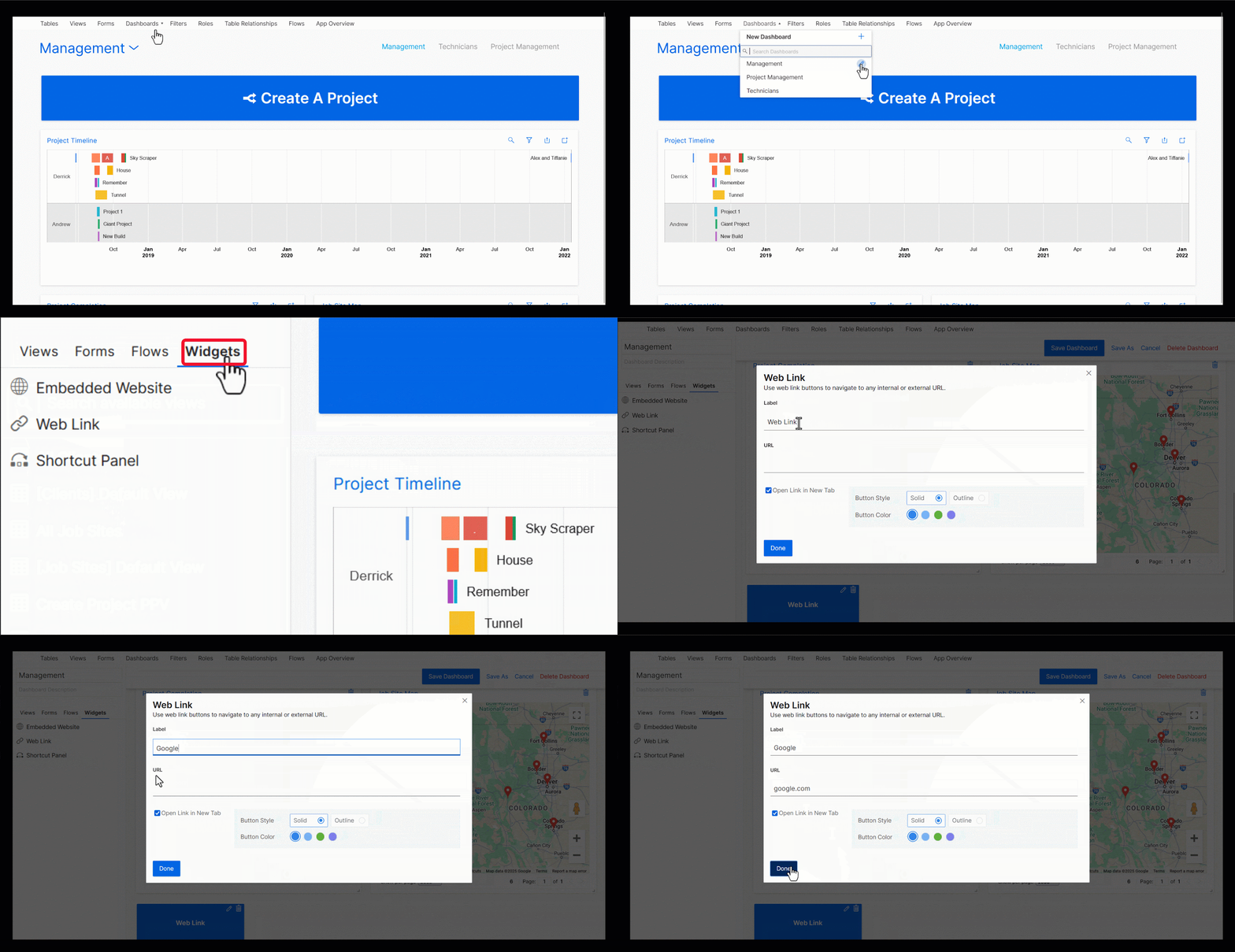
To set up a Web Link, edit the dashboard, click on the “Widgets” tab, and select “Web Link”, then enter the URL of the website you want to link to and customize the button as you see fit. Once you’re finished, save your dashboard and give it a try!
**Don’t forget to check out our other helpful resources below!**
- [TrackVia Help Center - How to Create a Dashboard](https://help.trackvia.com/hc/en-us/articles/8702927536027-How-to-create-a-dashboard)
- [TrackVia Help Center - Web Links for Dashboards](https://help.trackvia.com/hc/en-us/articles/8278613048219-August-2021-Web-Links-for-Dashboards)
- [Webinar - Creating Clean and Valuable Dashboards](https://university.trackvia.com/creating-clean-and-valuable-dashboards)
## Related articles
- [Use a Checkbox field to quickly open and close Child View Sections on Forms](https://help.trackvia.com/hc/en-us/related/click?data=BAh7CjobZGVzdGluYXRpb25fYXJ0aWNsZV9pZGwrCJuLa%2BmkHzoYcmVmZXJyZXJfYXJ0aWNsZV9pZGwrCBttWIXkHjoLbG9jYWxlSSIKZW4tdXMGOgZFVDoIdXJsSSJyL2hjL2VuLXVzL2FydGljbGVzLzM0NzkzMTUxMjM3MDE5LVVzZS1hLUNoZWNrYm94LWZpZWxkLXRvLXF1aWNrbHktb3Blbi1hbmQtY2xvc2UtQ2hpbGQtVmlldy1TZWN0aW9ucy1vbi1Gb3JtcwY7CFQ6CXJhbmtpBg%3D%3D--a9bd3dff58d99966376ce73135037579544986d6)
- [Charts & View Types Overview](https://help.trackvia.com/hc/en-us/related/click?data=BAh7CjobZGVzdGluYXRpb25fYXJ0aWNsZV9pZGwrCBvqtfY7HzoYcmVmZXJyZXJfYXJ0aWNsZV9pZGwrCBttWIXkHjoLbG9jYWxlSSIKZW4tdXMGOgZFVDoIdXJsSSJBL2hjL2VuLXVzL2FydGljbGVzLzM0MzQyNDAyNjQ4NjAzLUNoYXJ0cy1WaWV3LVR5cGVzLU92ZXJ2aWV3BjsIVDoJcmFua2kH--cb3675f2253dea57ddd9cbb7e5a6d24351c43bc9)
- [Complete List of Functions](https://help.trackvia.com/hc/en-us/related/click?data=BAh7CjobZGVzdGluYXRpb25fYXJ0aWNsZV9pZGwrCBtVbbGTCzoYcmVmZXJyZXJfYXJ0aWNsZV9pZGwrCBttWIXkHjoLbG9jYWxlSSIKZW4tdXMGOgZFVDoIdXJsSSJBL2hjL2VuLXVzL2FydGljbGVzLzEyNzI4OTY0ODMwNDkxLUNvbXBsZXRlLUxpc3Qtb2YtRnVuY3Rpb25zBjsIVDoJcmFua2kI--a32ff78885ae6ab1717201e768e2f400057f4f78)
- [February, 2025: Database Update](https://help.trackvia.com/hc/en-us/related/click?data=BAh7CjobZGVzdGluYXRpb25fYXJ0aWNsZV9pZGwrCJuSo24VHToYcmVmZXJyZXJfYXJ0aWNsZV9pZGwrCBttWIXkHjoLbG9jYWxlSSIKZW4tdXMGOgZFVDoIdXJsSSJEL2hjL2VuLXVzL2FydGljbGVzLzMxOTc3ODg3NzMyMzc5LUZlYnJ1YXJ5LTIwMjUtRGF0YWJhc2UtVXBkYXRlBjsIVDoJcmFua2kJ--b63b874d86ab363e299402a89f4752407a9dbe5c)
- [September, 2024: Limited User Access to History Logs](https://help.trackvia.com/hc/en-us/related/click?data=BAh7CjobZGVzdGluYXRpb25fYXJ0aWNsZV9pZGwrCBtY5Y%2FDGDoYcmVmZXJyZXJfYXJ0aWNsZV9pZGwrCBttWIXkHjoLbG9jYWxlSSIKZW4tdXMGOgZFVDoIdXJsSSJZL2hjL2VuLXVzL2FydGljbGVzLzI3MjI4MjExODYxNTMxLVNlcHRlbWJlci0yMDI0LUxpbWl0ZWQtVXNlci1BY2Nlc3MtdG8tSGlzdG9yeS1Mb2dzBjsIVDoJcmFua2kK--9c67774430f8c6fbe3d1980d9bc62967513938c8)
Please [sign in](https://help.trackvia.com/hc/en-us/signin?return_to=https%3A%2F%2Fhelp.trackvia.com%2Fhc%2Fen-us%2Farticles%2F33966838541595-5-Creative-Uses-for-Web-Links-on-Dashboards) to leave a comment.
[Powered by Zendesk](https://www.zendesk.com/service/help-center/?utm_source=helpcenter&utm_medium=poweredbyzendesk&utm_campaign=text&utm_content=TrackVia)
[iframe](https://td.doubleclick.net/td/ga/rul?tid=G-XMMWW2S2NC&gacid=1803541989.1743446128>m=45je53r0v887411077za200zb9136995142&dma=0&gcd=13l3l3l3l1l1&npa=0&pscdl=noapi&aip=1&fledge=1&frm=0&tag_exp=102015666~102482433~102788824~102803279~102813109~102887800~102926062~102964103~102975949~102976415&z=1209095317)
---
[Skip to main content](https://help.trackvia.com/hc/en-us/articles/8109973463323-5-Key-Best-Practices-for-User-Acceptance-Testing#main-content)

TrackVia offers a platform that can enable you to create a multitude of applications, but there are many elements that go along with creating a successful application that will meet your users’ expectations. At TrackVia, we offer a comprehensive service where we **design, develop, test,** and **deploy** a low-code application, built specifically for you. However, if you’re working on your own application, we also share proven best practices that will make your project a success.
Previously we covered the **design phase**, where requirements are laid out and User stories are written. In the comprehensive service package we would follow the design phase with the **development phase** where TrackVia and you (the customer) would go through a number of iterative feedback loops of Building → Reviewing (Feedback) → Revising → Back to Building. The next phase we enter is the **testing phase**, also known as User Acceptance Testing (UAT), which is what we’ll talk about in this article.
**What is UAT?**
User Acceptance Testing (UAT) is the last step before the application is **deployed**, and it plays a key role because it validates whether the business requirements are fulfilled and working as expected. The User Stories that were written during the **design phase**, will be used as success criteria for the **testing phase**.
**TrackVia’s Unique Approach to UAT**
At TrackVia, we follow an Agile approach which welcomes and encourages the constant changes that naturally occur in the development of an application. This allows for the delivery of software to be swift and frequent via the iterations previously described.
The greatest value developing in this manner is the iterative process, where we cycle through a number of feedback loops during the **development phase**, before the formal UAT cycle even begins. In other words, because of how flexible the platform is, and how easy it is to make changes, we begin testing and revising the moment we start building!
Once we have completed the build and iterated through a few of these loops, we are setting ourselves up for success, and we will be at a great starting point for the official UAT cycle to begin. We will now discuss what we consider to be the Best Practices when going through the **testing phase** (UAT).
**UAT Best Practices**
1. _**User designation.**_ Designate the users that will be testing the application. This includes a combination of key stakeholders (which should include those who have been involved since the **design phase**) as well as the users that will be using the application. We want their feedback since this application was built specifically for them.
2. _**Test scripts.**_ These are test plans where we outline and describe the scenarios that need to be tested, in order to make sure the app meets the requirements that were created in the design phase (as User Stories). We use the User Stories to create well-rounded test scripts for the test team to go through, without forgetting to test the edge case scenarios that are not super common. The User Stories will be the foundation of the test scripts, and they will also be our success criteria while testing.
3. _**Structure, structure, structure.**_ The more you plan the details around your testing, the more you’ll be ready for the **deployment phase**. Who will be testing? Have we put them in groups yet? When will this happen? How long will it be? Do we have the test scripts ready? These logistics will ensure that we get the most out of the **testing phase**.
4. _**Tracking the Feedback.**_ Within your TrackVia account you’ll have a fully functioning “Tracking” app where we’ll store all of the User Stories, as well as all of the Feedback items. This means that everything that your test team finds that needs to be fixed, will be entered into this application, so that your Implementation Engineer can evaluate the feedback.
5. _**Prioritize the feedback**._ After the feedback has been collected, figure out what must be fixed before going live. Everything that comes out of UAT does not need to be fixed immediately, so prioritize the feedback, and work together with the Implementation Engineer to figure out what must be fixed asap.
These proven best practices will help you deploy an application that your users will love. If you’d like a helping hand with any stage of a TrackVia application delivery please drop us a note at [Services@trackvia.com](mailto:Services@trackvia.com).
## Related articles
- [Order of Operations](https://help.trackvia.com/hc/en-us/related/click?data=BAh7CjobZGVzdGluYXRpb25fYXJ0aWNsZV9pZGwrCBuxoi5mBzoYcmVmZXJyZXJfYXJ0aWNsZV9pZGwrCBthFkBgBzoLbG9jYWxlSSIKZW4tdXMGOgZFVDoIdXJsSSI5L2hjL2VuLXVzL2FydGljbGVzLzgxMzU0NTA0NzI3MzEtT3JkZXItb2YtT3BlcmF0aW9ucwY7CFQ6CXJhbmtpBg%3D%3D--4d21375e4465d8f4062899beea51720c2b02adcb)
- [How to Create and Assign User Groups](https://help.trackvia.com/hc/en-us/related/click?data=BAh7CjobZGVzdGluYXRpb25fYXJ0aWNsZV9pZGwrCJvCRgHwBzoYcmVmZXJyZXJfYXJ0aWNsZV9pZGwrCBthFkBgBzoLbG9jYWxlSSIKZW4tdXMGOgZFVDoIdXJsSSJKL2hjL2VuLXVzL2FydGljbGVzLzg3MjczOTQ5NjAwMjctSG93LXRvLUNyZWF0ZS1hbmQtQXNzaWduLVVzZXItR3JvdXBzBjsIVDoJcmFua2kH--01a69c4d835c23856349802dd6a95b4fd0142079)
- [TrackVia Public Webforms Security Model](https://help.trackvia.com/hc/en-us/related/click?data=BAh7CjobZGVzdGluYXRpb25fYXJ0aWNsZV9pZGwrCBvBAvAqFDoYcmVmZXJyZXJfYXJ0aWNsZV9pZGwrCBthFkBgBzoLbG9jYWxlSSIKZW4tdXMGOgZFVDoIdXJsSSJOL2hjL2VuLXVzL2FydGljbGVzLzIyMTc0NjQ3ODk0Mjk5LVRyYWNrVmlhLVB1YmxpYy1XZWJmb3Jtcy1TZWN1cml0eS1Nb2RlbAY7CFQ6CXJhbmtpCA%3D%3D--770bd5cccf189e1d20c3de10886dda12ba886de8)
- [Contact TrackVia Support](https://help.trackvia.com/hc/en-us/related/click?data=BAh7CjobZGVzdGluYXRpb25fYXJ0aWNsZV9pZGwrCBsd61oTDzoYcmVmZXJyZXJfYXJ0aWNsZV9pZGwrCBthFkBgBzoLbG9jYWxlSSIKZW4tdXMGOgZFVDoIdXJsSSI%2FL2hjL2VuLXVzL2FydGljbGVzLzE2NTc1ODA0MTUzMTE1LUNvbnRhY3QtVHJhY2tWaWEtU3VwcG9ydAY7CFQ6CXJhbmtpCQ%3D%3D--190d1740e9f3e18ef8b836fe58d90b4264e7c259)
Please [sign in](https://help.trackvia.com/hc/en-us/signin?return_to=https%3A%2F%2Fhelp.trackvia.com%2Fhc%2Fen-us%2Farticles%2F8109973463323-5-Key-Best-Practices-for-User-Acceptance-Testing) to leave a comment.
[Powered by Zendesk](https://www.zendesk.com/service/help-center/?utm_source=helpcenter&utm_medium=poweredbyzendesk&utm_campaign=text&utm_content=TrackVia)
[iframe](https://td.doubleclick.net/td/ga/rul?tid=G-XMMWW2S2NC&gacid=516921449.1743444985>m=45je53r0v887411077za200&dma=0&gcd=13l3l3l3l1l1&npa=0&pscdl=noapi&aip=1&fledge=1&frm=0&tag_exp=102482433~102788824~102803279~102813109~102887799~102926062&z=1291929820)
---
[Skip to main content](https://help.trackvia.com/hc/en-us/articles/8782036597403#main-content)
# oops
## The page you were looking for doesn't exist
You may have mistyped the address or the page may have moved
[Take me back to the home page](https://help.trackvia.com/hc/en-us "Home")
[Powered by Zendesk](https://www.zendesk.com/service/help-center/?utm_source=helpcenter&utm_medium=poweredbyzendesk&utm_campaign=text&utm_content=TrackVia)
[iframe](https://td.doubleclick.net/td/ga/rul?tid=G-XMMWW2S2NC&gacid=1571920122.1743444891>m=45je53r0v887411077za200zb9136995142&dma=0&gcd=13l3l3l3l1l1&npa=0&pscdl=noapi&aip=1&fledge=1&frm=0&tag_exp=102482433~102509682~102788824~102803279~102813109~102887800~102926062&z=378219801)
---
[Skip to main content](https://help.trackvia.com/hc/en-us/articles/8700168754843-API-Authentication-and-Access#main-content)
## **Why must I authenticate?**
TrackVia uses **Open Authorization (OAuth) Tokens** to verify a user's identity and permission level before granting access to our API. This ensures account security by limiting API access and enforcing permissions. TrackVia provides Super Admin users the ability to create up to 100 unique authorization tokens, each with its own expiration date and, potentially, its own set of permissions.
To grant API access, follow the steps below to create Authorization Tokens.
## **Create an API User**
To enable API access, users will first need to set up an **API User**. API Users are a special category of user and are used only for API connections and integrations. Designating a user as an API User means that user will:
- **Restrict Web and Mobile access.** API Users are unable to use either the TrackVia web or mobile applications.
- **Bypass Single Sign On (SSO).** API Users bypass SSO login in order to prevent their Authorization Tokens from inadvertently expiring due to SSO policies.
- **Ignore password expiration policies.** API Users are exempt from TrackVia password expiration policies.
- **Be eligible for Authorization Token creation.** Only API Users may be used to create Authorization Tokens.
- **Have permissions managed like any other user**. API Users will still need to be put in a properly configured role in order to have read, write, or delete permissions in an account.
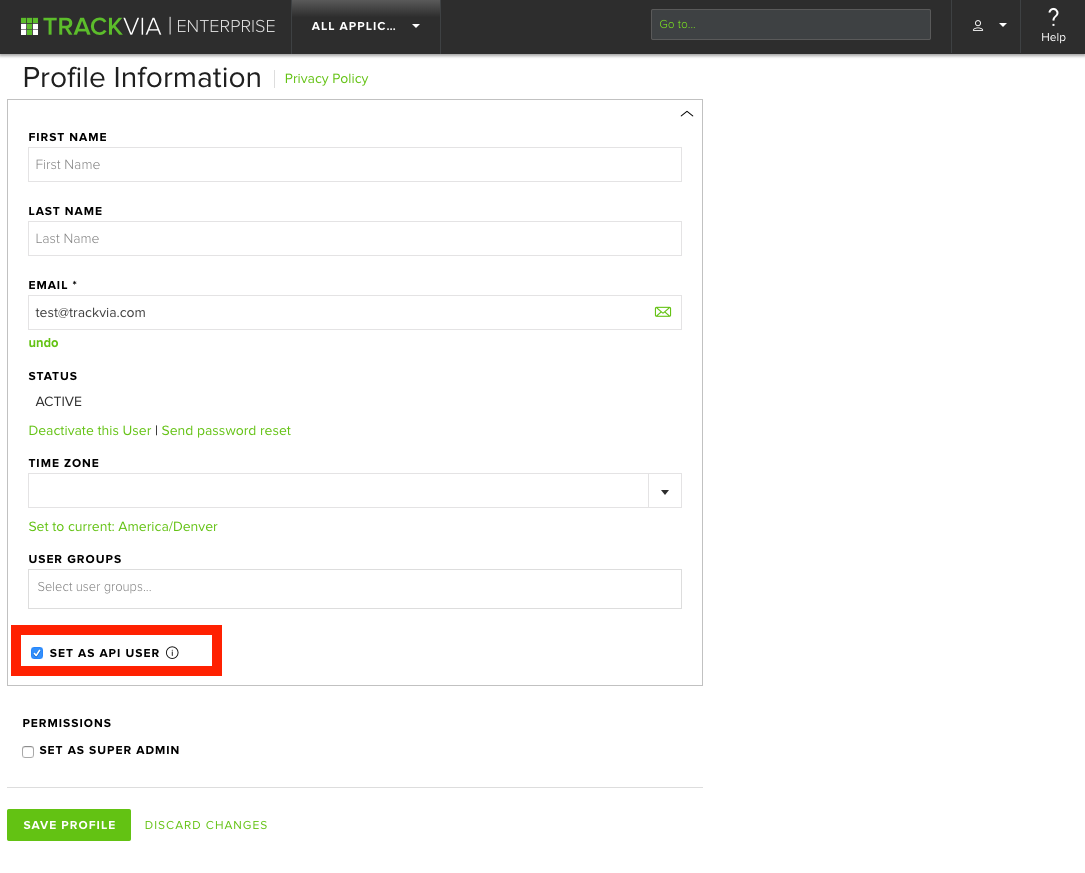
To designate a User Profile as an API User, navigate to **Manage Users** and select the profile page of the user you want to designate. Check the **Set As API User** box on that user's profile. Note: Users in "Unverified" status may not be designated as API Users.
## Locate the API Key
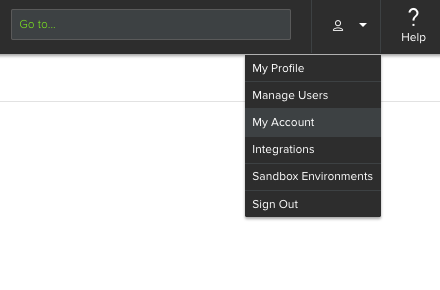
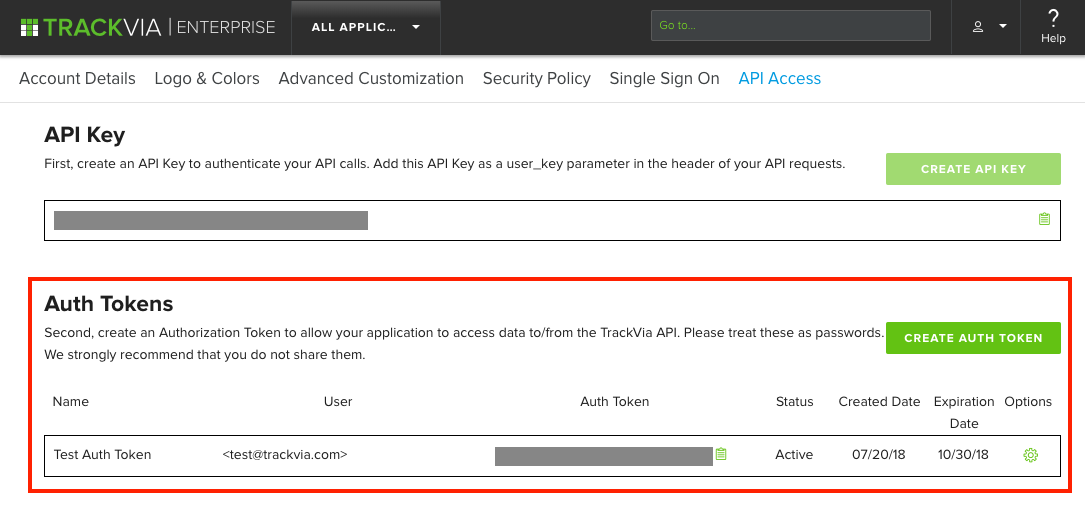
To enable API access, navigate to the API Access tab under My Account.
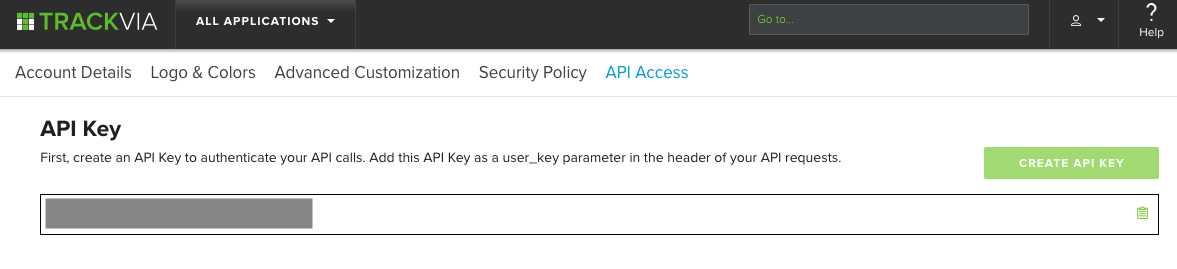
The API Key is unique to your TrackVia account and is a critical component for accessing the TrackVia API. Once generated, it cannot be changed or deleted. It can be copied for use in an integration using the clipboard icon. This API Key should be used as the user\_key parameter in the header of API requests.
## Create Authorization Tokens
After creating at least one API User, Super Admins will be able to create authorization tokens by clicking **Create Auth Token**.
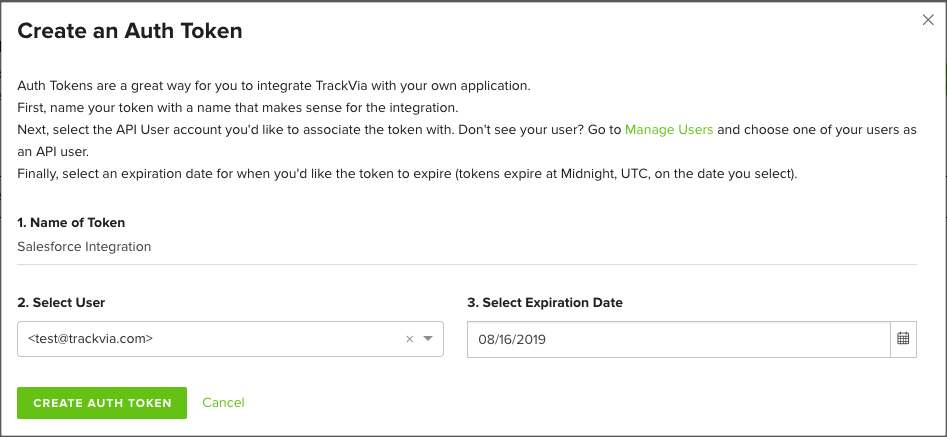
A window will open for the Super Admin to set the Token's name, API User, and Expiration Date. Once created, these values cannot be changed.
Only active users, designated as an **API User,** will be shown in this window.
The expiration date can be any date in the future and will expire at Midnight UTC on the date selected.
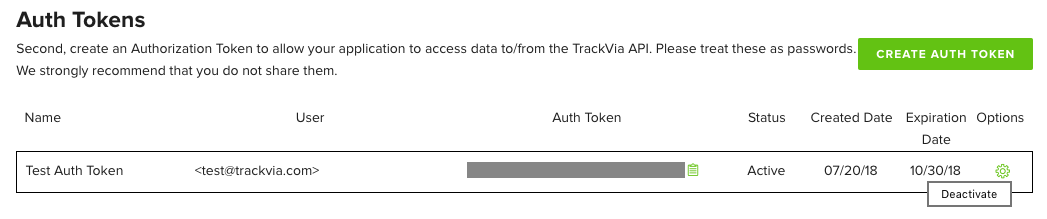
Once created, Auth Tokens can be copied using the clipboard icon and used in Integrations and Microservices. They can be turned off by clicking the gear icon and selecting _Deactivate_.
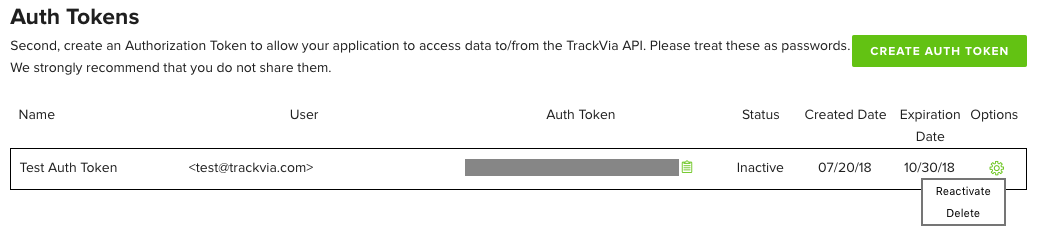
Inactive or expired tokens can be deleted by clicking the gear icon. While inactive tokens may be reactivated, expired tokens cannot be re-used.
For more information, please consult our [developer documents](https://developer.trackvia.com/ "Link: https://developer.trackvia.com") or contact [TrackVia Support](mailto:support@trackvia.com).
## Related articles
- [TrackVia API](https://help.trackvia.com/hc/en-us/related/click?data=BAh7CjobZGVzdGluYXRpb25fYXJ0aWNsZV9pZGwrCJvFGbvpBzoYcmVmZXJyZXJfYXJ0aWNsZV9pZGwrCJvWd6rpBzoLbG9jYWxlSSIKZW4tdXMGOgZFVDoIdXJsSSIyL2hjL2VuLXVzL2FydGljbGVzLzg3MDA0NDc4MDI3NzktVHJhY2tWaWEtQVBJBjsIVDoJcmFua2kG--bf0d2935419c229690211a6dac6304b7a0a26c28)
- [Setting up Single Sign On](https://help.trackvia.com/hc/en-us/related/click?data=BAh7CjobZGVzdGluYXRpb25fYXJ0aWNsZV9pZGwrCJubxZXpBzoYcmVmZXJyZXJfYXJ0aWNsZV9pZGwrCJvWd6rpBzoLbG9jYWxlSSIKZW4tdXMGOgZFVDoIdXJsSSI%2FL2hjL2VuLXVzL2FydGljbGVzLzg2OTk4MjE1MzAwMTEtU2V0dGluZy11cC1TaW5nbGUtU2lnbi1PbgY7CFQ6CXJhbmtpBw%3D%3D--dfe1fa6b324e8d827f55956da8d760ba70be834c)
- [Contact TrackVia Support](https://help.trackvia.com/hc/en-us/related/click?data=BAh7CjobZGVzdGluYXRpb25fYXJ0aWNsZV9pZGwrCBsd61oTDzoYcmVmZXJyZXJfYXJ0aWNsZV9pZGwrCJvWd6rpBzoLbG9jYWxlSSIKZW4tdXMGOgZFVDoIdXJsSSI%2FL2hjL2VuLXVzL2FydGljbGVzLzE2NTc1ODA0MTUzMTE1LUNvbnRhY3QtVHJhY2tWaWEtU3VwcG9ydAY7CFQ6CXJhbmtpCA%3D%3D--917b93f9f5dfc51d269b1ee057751d5a0dc80fb0)
- [The Open API and Sandbox Accounts](https://help.trackvia.com/hc/en-us/related/click?data=BAh7CjobZGVzdGluYXRpb25fYXJ0aWNsZV9pZGwrCJu7opfuBzoYcmVmZXJyZXJfYXJ0aWNsZV9pZGwrCJvWd6rpBzoLbG9jYWxlSSIKZW4tdXMGOgZFVDoIdXJsSSJHL2hjL2VuLXVzL2FydGljbGVzLzg3MjEzMjc2MzUzNTUtVGhlLU9wZW4tQVBJLWFuZC1TYW5kYm94LUFjY291bnRzBjsIVDoJcmFua2kJ--fba6fa67742a78d45a85443b1dfdc15ef072282c)
- [TrackVia University On-Demand: Integration Platform (Workato) Course](https://help.trackvia.com/hc/en-us/related/click?data=BAh7CjobZGVzdGluYXRpb25fYXJ0aWNsZV9pZGwrCJu842rjDjoYcmVmZXJyZXJfYXJ0aWNsZV9pZGwrCJvWd6rpBzoLbG9jYWxlSSIKZW4tdXMGOgZFVDoIdXJsSSJoL2hjL2VuLXVzL2FydGljbGVzLzE2MzY5OTEzNjc0OTA3LVRyYWNrVmlhLVVuaXZlcnNpdHktT24tRGVtYW5kLUludGVncmF0aW9uLVBsYXRmb3JtLVdvcmthdG8tQ291cnNlBjsIVDoJcmFua2kK--ef6c320770ee6cf92916c95a6ecd47443538ec11)
Please [sign in](https://help.trackvia.com/hc/en-us/signin?return_to=https%3A%2F%2Fhelp.trackvia.com%2Fhc%2Fen-us%2Farticles%2F8700168754843-API-Authentication-and-Access%3Finput_string%3Dsso) to leave a comment.
[Powered by Zendesk](https://www.zendesk.com/service/help-center/?utm_source=helpcenter&utm_medium=poweredbyzendesk&utm_campaign=text&utm_content=TrackVia)
[iframe](https://td.doubleclick.net/td/ga/rul?tid=G-XMMWW2S2NC&gacid=2137956566.1743443191>m=45je53r0v887411077za200&dma=0&gcd=13l3l3l3l1l1&npa=0&pscdl=noapi&aip=1&fledge=1&frm=0&tag_exp=102482433~102788824~102803279~102813109~102887799~102926062&z=320216040)
---
[Skip to main content](https://help.trackvia.com/hc/en-us/articles/9437511105179-API-and-Calculated-text-field#main-content)
Hi we have a table that has calculated fields, we are importing data into the table via API but the calculated fields are not calculating? Does anyone have an easy fix
Alan shared this idea · Jan 31, 2018
## Related articles
- [Triggered Fields vs. Calculated Fields](https://help.trackvia.com/hc/en-us/related/click?data=BAh7CjobZGVzdGluYXRpb25fYXJ0aWNsZV9pZGwrCBtH4sv8BzoYcmVmZXJyZXJfYXJ0aWNsZV9pZGwrCJs6f1eVCDoLbG9jYWxlSSIKZW4tdXMGOgZFVDoIdXJsSSJLL2hjL2VuLXVzL2FydGljbGVzLzg3ODIzMzM3NTcyMTEtVHJpZ2dlcmVkLUZpZWxkcy12cy1DYWxjdWxhdGVkLUZpZWxkcwY7CFQ6CXJhbmtpBg%3D%3D--70d94107f734a68d1800166f0d2c764c188b736a)
- [Use Regular Expression in Contains() or Snip()](https://help.trackvia.com/hc/en-us/related/click?data=BAh7CjobZGVzdGluYXRpb25fYXJ0aWNsZV9pZGwrCJurvLGhCDoYcmVmZXJyZXJfYXJ0aWNsZV9pZGwrCJs6f1eVCDoLbG9jYWxlSSIKZW4tdXMGOgZFVDoIdXJsSSJQL2hjL2VuLXVzL2FydGljbGVzLzk0OTA1NjQ2ODg3OTUtVXNlLVJlZ3VsYXItRXhwcmVzc2lvbi1pbi1Db250YWlucy1vci1TbmlwBjsIVDoJcmFua2kH--b4296a682307db98ba8b9a19b386a675c60885bd)
- [How to setup Table Level Indexing](https://help.trackvia.com/hc/en-us/related/click?data=BAh7CjobZGVzdGluYXRpb25fYXJ0aWNsZV9pZGwrCJtWit38BzoYcmVmZXJyZXJfYXJ0aWNsZV9pZGwrCJs6f1eVCDoLbG9jYWxlSSIKZW4tdXMGOgZFVDoIdXJsSSJHL2hjL2VuLXVzL2FydGljbGVzLzg3ODI2Mjk5ODM4OTktSG93LXRvLXNldHVwLVRhYmxlLUxldmVsLUluZGV4aW5nBjsIVDoJcmFua2kI--cebb67ab0c75c7b9eb15cdac9112254dd90b7889)
- [Using the {{OLD}} function to log history of multiple fields](https://help.trackvia.com/hc/en-us/related/click?data=BAh7CjobZGVzdGluYXRpb25fYXJ0aWNsZV9pZGwrCJszqiHsDjoYcmVmZXJyZXJfYXJ0aWNsZV9pZGwrCJs6f1eVCDoLbG9jYWxlSSIKZW4tdXMGOgZFVDoIdXJsSSJfL2hjL2VuLXVzL2FydGljbGVzLzE2NDA3MzM5ODczMTc5LVVzaW5nLXRoZS1PTEQtZnVuY3Rpb24tdG8tbG9nLWhpc3Rvcnktb2YtbXVsdGlwbGUtZmllbGRzBjsIVDoJcmFua2kJ--a3529865ec845a50d0c35643eee0ed5d96b2d231)
- [App Scripts Overview](https://help.trackvia.com/hc/en-us/related/click?data=BAh7CjobZGVzdGluYXRpb25fYXJ0aWNsZV9pZGwrCJtQ9XdhDjoYcmVmZXJyZXJfYXJ0aWNsZV9pZGwrCJs6f1eVCDoLbG9jYWxlSSIKZW4tdXMGOgZFVDoIdXJsSSI7L2hjL2VuLXVzL2FydGljbGVzLzE1ODExNzg3MTgyMjM1LUFwcC1TY3JpcHRzLU92ZXJ2aWV3BjsIVDoJcmFua2kK--481d89ea6551468329761728fa425cda25dee281)
- 
[Tiffanie Staver](https://help.trackvia.com/hc/en-us/profiles/7920567741467-Tiffanie-Staver)
- 2 years ago
**John McGarveycommented · February 1, 2018 8:48 AM**
I am not familiar with how the TrackVia API's work, but calculated fields should be calculating when data is added/updated.
I do know that Apps Scripts do not run during import and/or bulk updates, so perhaps this is the same scenario. For this, I've had to update each record separately to get the script to run.
You may want to load a default view (all records). The system is supposed to run any calculations each time a view is loaded, unless you are using Triggered Fields, in which case you are back to updating each record separately.
I'll be watching for replies on this as I am interested in this also.
0
Please [sign in](https://help.trackvia.com/hc/en-us/signin?return_to=https%3A%2F%2Fhelp.trackvia.com%2Fhc%2Fen-us%2Farticles%2F9437511105179-API-and-Calculated-text-field%3Fsort_by%3Dvotes) to leave a comment.
[Powered by Zendesk](https://www.zendesk.com/service/help-center/?utm_source=helpcenter&utm_medium=poweredbyzendesk&utm_campaign=text&utm_content=TrackVia)
Permalink
---
[Skip to main content](https://help.trackvia.com/hc/en-us/articles/9437511105179-API-and-Calculated-text-field?sort_by=votes#main-content)
Hi we have a table that has calculated fields, we are importing data into the table via API but the calculated fields are not calculating? Does anyone have an easy fix
Alan shared this idea · Jan 31, 2018
## Related articles
- [Triggered Fields vs. Calculated Fields](https://help.trackvia.com/hc/en-us/related/click?data=BAh7CjobZGVzdGluYXRpb25fYXJ0aWNsZV9pZGwrCBtH4sv8BzoYcmVmZXJyZXJfYXJ0aWNsZV9pZGwrCJs6f1eVCDoLbG9jYWxlSSIKZW4tdXMGOgZFVDoIdXJsSSJLL2hjL2VuLXVzL2FydGljbGVzLzg3ODIzMzM3NTcyMTEtVHJpZ2dlcmVkLUZpZWxkcy12cy1DYWxjdWxhdGVkLUZpZWxkcwY7CFQ6CXJhbmtpBg%3D%3D--70d94107f734a68d1800166f0d2c764c188b736a)
- [Use Regular Expression in Contains() or Snip()](https://help.trackvia.com/hc/en-us/related/click?data=BAh7CjobZGVzdGluYXRpb25fYXJ0aWNsZV9pZGwrCJurvLGhCDoYcmVmZXJyZXJfYXJ0aWNsZV9pZGwrCJs6f1eVCDoLbG9jYWxlSSIKZW4tdXMGOgZFVDoIdXJsSSJQL2hjL2VuLXVzL2FydGljbGVzLzk0OTA1NjQ2ODg3OTUtVXNlLVJlZ3VsYXItRXhwcmVzc2lvbi1pbi1Db250YWlucy1vci1TbmlwBjsIVDoJcmFua2kH--b4296a682307db98ba8b9a19b386a675c60885bd)
- [How to setup Table Level Indexing](https://help.trackvia.com/hc/en-us/related/click?data=BAh7CjobZGVzdGluYXRpb25fYXJ0aWNsZV9pZGwrCJtWit38BzoYcmVmZXJyZXJfYXJ0aWNsZV9pZGwrCJs6f1eVCDoLbG9jYWxlSSIKZW4tdXMGOgZFVDoIdXJsSSJHL2hjL2VuLXVzL2FydGljbGVzLzg3ODI2Mjk5ODM4OTktSG93LXRvLXNldHVwLVRhYmxlLUxldmVsLUluZGV4aW5nBjsIVDoJcmFua2kI--cebb67ab0c75c7b9eb15cdac9112254dd90b7889)
- [Using the {{OLD}} function to log history of multiple fields](https://help.trackvia.com/hc/en-us/related/click?data=BAh7CjobZGVzdGluYXRpb25fYXJ0aWNsZV9pZGwrCJszqiHsDjoYcmVmZXJyZXJfYXJ0aWNsZV9pZGwrCJs6f1eVCDoLbG9jYWxlSSIKZW4tdXMGOgZFVDoIdXJsSSJfL2hjL2VuLXVzL2FydGljbGVzLzE2NDA3MzM5ODczMTc5LVVzaW5nLXRoZS1PTEQtZnVuY3Rpb24tdG8tbG9nLWhpc3Rvcnktb2YtbXVsdGlwbGUtZmllbGRzBjsIVDoJcmFua2kJ--a3529865ec845a50d0c35643eee0ed5d96b2d231)
- [App Scripts Overview](https://help.trackvia.com/hc/en-us/related/click?data=BAh7CjobZGVzdGluYXRpb25fYXJ0aWNsZV9pZGwrCJtQ9XdhDjoYcmVmZXJyZXJfYXJ0aWNsZV9pZGwrCJs6f1eVCDoLbG9jYWxlSSIKZW4tdXMGOgZFVDoIdXJsSSI7L2hjL2VuLXVzL2FydGljbGVzLzE1ODExNzg3MTgyMjM1LUFwcC1TY3JpcHRzLU92ZXJ2aWV3BjsIVDoJcmFua2kK--481d89ea6551468329761728fa425cda25dee281)
- 
[Tiffanie Staver](https://help.trackvia.com/hc/en-us/profiles/7920567741467-Tiffanie-Staver)
- 2 years ago
**John McGarveycommented · February 1, 2018 8:48 AM**
I am not familiar with how the TrackVia API's work, but calculated fields should be calculating when data is added/updated.
I do know that Apps Scripts do not run during import and/or bulk updates, so perhaps this is the same scenario. For this, I've had to update each record separately to get the script to run.
You may want to load a default view (all records). The system is supposed to run any calculations each time a view is loaded, unless you are using Triggered Fields, in which case you are back to updating each record separately.
I'll be watching for replies on this as I am interested in this also.
0
Please [sign in](https://help.trackvia.com/hc/en-us/signin?return_to=https%3A%2F%2Fhelp.trackvia.com%2Fhc%2Fen-us%2Farticles%2F9437511105179-API-and-Calculated-text-field%3Fsort_by%3Dvotes) to leave a comment.
[Powered by Zendesk](https://www.zendesk.com/service/help-center/?utm_source=helpcenter&utm_medium=poweredbyzendesk&utm_campaign=text&utm_content=TrackVia)
[iframe](https://td.doubleclick.net/td/ga/rul?tid=G-XMMWW2S2NC&gacid=1344170198.1743442931>m=45je53r0v887411077za200&dma=0&gcd=13l3l3l3l1l1&npa=0&pscdl=noapi&aip=1&fledge=1&frm=0&tag_exp=102482433~102788824~102803279~102813109~102887800~102926062&z=2007008156)
Permalink
---
[Skip to main content](https://help.trackvia.com/hc/en-us/articles/9437511105179-API-and-Calculated-text-field?sort_by=created_at#main-content)
Hi we have a table that has calculated fields, we are importing data into the table via API but the calculated fields are not calculating? Does anyone have an easy fix
Alan shared this idea · Jan 31, 2018
## Related articles
- [Triggered Fields vs. Calculated Fields](https://help.trackvia.com/hc/en-us/related/click?data=BAh7CjobZGVzdGluYXRpb25fYXJ0aWNsZV9pZGwrCBtH4sv8BzoYcmVmZXJyZXJfYXJ0aWNsZV9pZGwrCJs6f1eVCDoLbG9jYWxlSSIKZW4tdXMGOgZFVDoIdXJsSSJLL2hjL2VuLXVzL2FydGljbGVzLzg3ODIzMzM3NTcyMTEtVHJpZ2dlcmVkLUZpZWxkcy12cy1DYWxjdWxhdGVkLUZpZWxkcwY7CFQ6CXJhbmtpBg%3D%3D--70d94107f734a68d1800166f0d2c764c188b736a)
- [Use Regular Expression in Contains() or Snip()](https://help.trackvia.com/hc/en-us/related/click?data=BAh7CjobZGVzdGluYXRpb25fYXJ0aWNsZV9pZGwrCJurvLGhCDoYcmVmZXJyZXJfYXJ0aWNsZV9pZGwrCJs6f1eVCDoLbG9jYWxlSSIKZW4tdXMGOgZFVDoIdXJsSSJQL2hjL2VuLXVzL2FydGljbGVzLzk0OTA1NjQ2ODg3OTUtVXNlLVJlZ3VsYXItRXhwcmVzc2lvbi1pbi1Db250YWlucy1vci1TbmlwBjsIVDoJcmFua2kH--b4296a682307db98ba8b9a19b386a675c60885bd)
- [How to setup Table Level Indexing](https://help.trackvia.com/hc/en-us/related/click?data=BAh7CjobZGVzdGluYXRpb25fYXJ0aWNsZV9pZGwrCJtWit38BzoYcmVmZXJyZXJfYXJ0aWNsZV9pZGwrCJs6f1eVCDoLbG9jYWxlSSIKZW4tdXMGOgZFVDoIdXJsSSJHL2hjL2VuLXVzL2FydGljbGVzLzg3ODI2Mjk5ODM4OTktSG93LXRvLXNldHVwLVRhYmxlLUxldmVsLUluZGV4aW5nBjsIVDoJcmFua2kI--cebb67ab0c75c7b9eb15cdac9112254dd90b7889)
- [Using the {{OLD}} function to log history of multiple fields](https://help.trackvia.com/hc/en-us/related/click?data=BAh7CjobZGVzdGluYXRpb25fYXJ0aWNsZV9pZGwrCJszqiHsDjoYcmVmZXJyZXJfYXJ0aWNsZV9pZGwrCJs6f1eVCDoLbG9jYWxlSSIKZW4tdXMGOgZFVDoIdXJsSSJfL2hjL2VuLXVzL2FydGljbGVzLzE2NDA3MzM5ODczMTc5LVVzaW5nLXRoZS1PTEQtZnVuY3Rpb24tdG8tbG9nLWhpc3Rvcnktb2YtbXVsdGlwbGUtZmllbGRzBjsIVDoJcmFua2kJ--a3529865ec845a50d0c35643eee0ed5d96b2d231)
- [App Scripts Overview](https://help.trackvia.com/hc/en-us/related/click?data=BAh7CjobZGVzdGluYXRpb25fYXJ0aWNsZV9pZGwrCJtQ9XdhDjoYcmVmZXJyZXJfYXJ0aWNsZV9pZGwrCJs6f1eVCDoLbG9jYWxlSSIKZW4tdXMGOgZFVDoIdXJsSSI7L2hjL2VuLXVzL2FydGljbGVzLzE1ODExNzg3MTgyMjM1LUFwcC1TY3JpcHRzLU92ZXJ2aWV3BjsIVDoJcmFua2kK--481d89ea6551468329761728fa425cda25dee281)
- 
[Tiffanie Staver](https://help.trackvia.com/hc/en-us/profiles/7920567741467-Tiffanie-Staver)
- 2 years ago
**John McGarveycommented · February 1, 2018 8:48 AM**
I am not familiar with how the TrackVia API's work, but calculated fields should be calculating when data is added/updated.
I do know that Apps Scripts do not run during import and/or bulk updates, so perhaps this is the same scenario. For this, I've had to update each record separately to get the script to run.
You may want to load a default view (all records). The system is supposed to run any calculations each time a view is loaded, unless you are using Triggered Fields, in which case you are back to updating each record separately.
I'll be watching for replies on this as I am interested in this also.
0
Please [sign in](https://help.trackvia.com/hc/en-us/signin?return_to=https%3A%2F%2Fhelp.trackvia.com%2Fhc%2Fen-us%2Farticles%2F9437511105179-API-and-Calculated-text-field%3Fsort_by%3Dvotes) to leave a comment.
[Powered by Zendesk](https://www.zendesk.com/service/help-center/?utm_source=helpcenter&utm_medium=poweredbyzendesk&utm_campaign=text&utm_content=TrackVia)
Permalink
---
[Skip to main content](https://help.trackvia.com/hc/en-us/articles/9437391959579-Add-tool-tips-to-views-fields?sort_by=votes#main-content)
Add tooltips to views/fields/flows.
The text widget is kind of klunky. Tooltips would be a more elegant solution for fields, but would also be useful to explain the purpose of a view or flow before someone jumps into one.
Anonymous shared this idea · Oct 12, 2018
## Related articles
- [How to Create Views](https://help.trackvia.com/hc/en-us/related/click?data=BAh7CjobZGVzdGluYXRpb25fYXJ0aWNsZV9pZGwrCJu%2FX4oDCDoYcmVmZXJyZXJfYXJ0aWNsZV9pZGwrCBs2ZVCVCDoLbG9jYWxlSSIKZW4tdXMGOgZFVDoIdXJsSSI5L2hjL2VuLXVzL2FydGljbGVzLzg4MTEyOTk0NTQ4NzUtSG93LXRvLUNyZWF0ZS1WaWV3cwY7CFQ6CXJhbmtpBg%3D%3D--c64507fd65753c5edf1f9d9b2f28c11229690394)
- [How to Create Relationships](https://help.trackvia.com/hc/en-us/related/click?data=BAh7CjobZGVzdGluYXRpb25fYXJ0aWNsZV9pZGwrCJvlGTDwBzoYcmVmZXJyZXJfYXJ0aWNsZV9pZGwrCBs2ZVCVCDoLbG9jYWxlSSIKZW4tdXMGOgZFVDoIdXJsSSJBL2hjL2VuLXVzL2FydGljbGVzLzg3MjgxODA1NDkwMTktSG93LXRvLUNyZWF0ZS1SZWxhdGlvbnNoaXBzBjsIVDoJcmFua2kH--43622ac7ae48481dd8d5a4548881bb7da86804b3)
- [How to Create and Assign User Groups](https://help.trackvia.com/hc/en-us/related/click?data=BAh7CjobZGVzdGluYXRpb25fYXJ0aWNsZV9pZGwrCJvCRgHwBzoYcmVmZXJyZXJfYXJ0aWNsZV9pZGwrCBs2ZVCVCDoLbG9jYWxlSSIKZW4tdXMGOgZFVDoIdXJsSSJKL2hjL2VuLXVzL2FydGljbGVzLzg3MjczOTQ5NjAwMjctSG93LXRvLUNyZWF0ZS1hbmQtQXNzaWduLVVzZXItR3JvdXBzBjsIVDoJcmFua2kI--35c30d33a0ef61fafeff4b738794d66d159a9560)
- [Building a New Flow](https://help.trackvia.com/hc/en-us/related/click?data=BAh7CjobZGVzdGluYXRpb25fYXJ0aWNsZV9pZGwrCJvrSCfqBzoYcmVmZXJyZXJfYXJ0aWNsZV9pZGwrCBs2ZVCVCDoLbG9jYWxlSSIKZW4tdXMGOgZFVDoIdXJsSSI5L2hjL2VuLXVzL2FydGljbGVzLzg3MDIyNjI4MzIwMjctQnVpbGRpbmctYS1OZXctRmxvdwY7CFQ6CXJhbmtpCQ%3D%3D--794f25a86316c82422db5ea1c64adbec9552a3f4)
- 
[Leeana Ramos](https://help.trackvia.com/hc/en-us/profiles/1268851993729-Leeana-Ramos)
- 2 years ago
**Cristinacommented · November 27, 2018 12:48 PM**
Hello,
Thank you for your comment. In TrackVia you can accomplish a similar functionality by adding a "Text" widget on a form, which will then allow you to write a note and place it on the location of your choice within the form.
The tooltip idea, however, would be a great feature to implement to the system. I have logged this feature request with our engineering team for a future enhancement.
Best,
Cristina
0
Please [sign in](https://help.trackvia.com/hc/en-us/signin?return_to=https%3A%2F%2Fhelp.trackvia.com%2Fhc%2Fen-us%2Farticles%2F9437391959579-Add-tool-tips-to-views-fields%3Fsort_by%3Dvotes) to leave a comment.
[Powered by Zendesk](https://www.zendesk.com/service/help-center/?utm_source=helpcenter&utm_medium=poweredbyzendesk&utm_campaign=text&utm_content=TrackVia)
Permalink
---
[Skip to main content](https://help.trackvia.com/hc/en-us/articles/9437391959579-Add-tool-tips-to-views-fields#main-content)
Add tooltips to views/fields/flows.
The text widget is kind of klunky. Tooltips would be a more elegant solution for fields, but would also be useful to explain the purpose of a view or flow before someone jumps into one.
Anonymous shared this idea · Oct 12, 2018
## Related articles
- [How to Create Views](https://help.trackvia.com/hc/en-us/related/click?data=BAh7CjobZGVzdGluYXRpb25fYXJ0aWNsZV9pZGwrCJu%2FX4oDCDoYcmVmZXJyZXJfYXJ0aWNsZV9pZGwrCBs2ZVCVCDoLbG9jYWxlSSIKZW4tdXMGOgZFVDoIdXJsSSI5L2hjL2VuLXVzL2FydGljbGVzLzg4MTEyOTk0NTQ4NzUtSG93LXRvLUNyZWF0ZS1WaWV3cwY7CFQ6CXJhbmtpBg%3D%3D--c64507fd65753c5edf1f9d9b2f28c11229690394)
- [How to Create Relationships](https://help.trackvia.com/hc/en-us/related/click?data=BAh7CjobZGVzdGluYXRpb25fYXJ0aWNsZV9pZGwrCJvlGTDwBzoYcmVmZXJyZXJfYXJ0aWNsZV9pZGwrCBs2ZVCVCDoLbG9jYWxlSSIKZW4tdXMGOgZFVDoIdXJsSSJBL2hjL2VuLXVzL2FydGljbGVzLzg3MjgxODA1NDkwMTktSG93LXRvLUNyZWF0ZS1SZWxhdGlvbnNoaXBzBjsIVDoJcmFua2kH--43622ac7ae48481dd8d5a4548881bb7da86804b3)
- [How to Create and Assign User Groups](https://help.trackvia.com/hc/en-us/related/click?data=BAh7CjobZGVzdGluYXRpb25fYXJ0aWNsZV9pZGwrCJvCRgHwBzoYcmVmZXJyZXJfYXJ0aWNsZV9pZGwrCBs2ZVCVCDoLbG9jYWxlSSIKZW4tdXMGOgZFVDoIdXJsSSJKL2hjL2VuLXVzL2FydGljbGVzLzg3MjczOTQ5NjAwMjctSG93LXRvLUNyZWF0ZS1hbmQtQXNzaWduLVVzZXItR3JvdXBzBjsIVDoJcmFua2kI--35c30d33a0ef61fafeff4b738794d66d159a9560)
- [Building a New Flow](https://help.trackvia.com/hc/en-us/related/click?data=BAh7CjobZGVzdGluYXRpb25fYXJ0aWNsZV9pZGwrCJvrSCfqBzoYcmVmZXJyZXJfYXJ0aWNsZV9pZGwrCBs2ZVCVCDoLbG9jYWxlSSIKZW4tdXMGOgZFVDoIdXJsSSI5L2hjL2VuLXVzL2FydGljbGVzLzg3MDIyNjI4MzIwMjctQnVpbGRpbmctYS1OZXctRmxvdwY7CFQ6CXJhbmtpCQ%3D%3D--794f25a86316c82422db5ea1c64adbec9552a3f4)
- 
[Leeana Ramos](https://help.trackvia.com/hc/en-us/profiles/1268851993729-Leeana-Ramos)
- 2 years ago
**Cristinacommented · November 27, 2018 12:48 PM**
Hello,
Thank you for your comment. In TrackVia you can accomplish a similar functionality by adding a "Text" widget on a form, which will then allow you to write a note and place it on the location of your choice within the form.
The tooltip idea, however, would be a great feature to implement to the system. I have logged this feature request with our engineering team for a future enhancement.
Best,
Cristina
0
Please [sign in](https://help.trackvia.com/hc/en-us/signin?return_to=https%3A%2F%2Fhelp.trackvia.com%2Fhc%2Fen-us%2Farticles%2F9437391959579-Add-tool-tips-to-views-fields%3Fsort_by%3Dvotes) to leave a comment.
[Powered by Zendesk](https://www.zendesk.com/service/help-center/?utm_source=helpcenter&utm_medium=poweredbyzendesk&utm_campaign=text&utm_content=TrackVia)
[iframe](https://td.doubleclick.net/td/ga/rul?tid=G-XMMWW2S2NC&gacid=1598137079.1743443280>m=45je53r0v887411077za200zb9136995142&dma=0&gcd=13l3l3l3l1l1&npa=0&pscdl=noapi&aip=1&fledge=1&frm=0&tag_exp=102482433~102509683~102788824~102803279~102813109~102887800~102926062~102976415&z=805116615)
Permalink
---
[Skip to main content](https://help.trackvia.com/hc/en-us/articles/9437391959579-Add-tool-tips-to-views-fields?sort_by=created_at#main-content)
Add tooltips to views/fields/flows.
The text widget is kind of klunky. Tooltips would be a more elegant solution for fields, but would also be useful to explain the purpose of a view or flow before someone jumps into one.
Anonymous shared this idea · Oct 12, 2018
## Related articles
- [How to Create Views](https://help.trackvia.com/hc/en-us/related/click?data=BAh7CjobZGVzdGluYXRpb25fYXJ0aWNsZV9pZGwrCJu%2FX4oDCDoYcmVmZXJyZXJfYXJ0aWNsZV9pZGwrCBs2ZVCVCDoLbG9jYWxlSSIKZW4tdXMGOgZFVDoIdXJsSSI5L2hjL2VuLXVzL2FydGljbGVzLzg4MTEyOTk0NTQ4NzUtSG93LXRvLUNyZWF0ZS1WaWV3cwY7CFQ6CXJhbmtpBg%3D%3D--c64507fd65753c5edf1f9d9b2f28c11229690394)
- [How to Create Relationships](https://help.trackvia.com/hc/en-us/related/click?data=BAh7CjobZGVzdGluYXRpb25fYXJ0aWNsZV9pZGwrCJvlGTDwBzoYcmVmZXJyZXJfYXJ0aWNsZV9pZGwrCBs2ZVCVCDoLbG9jYWxlSSIKZW4tdXMGOgZFVDoIdXJsSSJBL2hjL2VuLXVzL2FydGljbGVzLzg3MjgxODA1NDkwMTktSG93LXRvLUNyZWF0ZS1SZWxhdGlvbnNoaXBzBjsIVDoJcmFua2kH--43622ac7ae48481dd8d5a4548881bb7da86804b3)
- [How to Create and Assign User Groups](https://help.trackvia.com/hc/en-us/related/click?data=BAh7CjobZGVzdGluYXRpb25fYXJ0aWNsZV9pZGwrCJvCRgHwBzoYcmVmZXJyZXJfYXJ0aWNsZV9pZGwrCBs2ZVCVCDoLbG9jYWxlSSIKZW4tdXMGOgZFVDoIdXJsSSJKL2hjL2VuLXVzL2FydGljbGVzLzg3MjczOTQ5NjAwMjctSG93LXRvLUNyZWF0ZS1hbmQtQXNzaWduLVVzZXItR3JvdXBzBjsIVDoJcmFua2kI--35c30d33a0ef61fafeff4b738794d66d159a9560)
- [Building a New Flow](https://help.trackvia.com/hc/en-us/related/click?data=BAh7CjobZGVzdGluYXRpb25fYXJ0aWNsZV9pZGwrCJvrSCfqBzoYcmVmZXJyZXJfYXJ0aWNsZV9pZGwrCBs2ZVCVCDoLbG9jYWxlSSIKZW4tdXMGOgZFVDoIdXJsSSI5L2hjL2VuLXVzL2FydGljbGVzLzg3MDIyNjI4MzIwMjctQnVpbGRpbmctYS1OZXctRmxvdwY7CFQ6CXJhbmtpCQ%3D%3D--794f25a86316c82422db5ea1c64adbec9552a3f4)
- 
[Leeana Ramos](https://help.trackvia.com/hc/en-us/profiles/1268851993729-Leeana-Ramos)
- 2 years ago
**Cristinacommented · November 27, 2018 12:48 PM**
Hello,
Thank you for your comment. In TrackVia you can accomplish a similar functionality by adding a "Text" widget on a form, which will then allow you to write a note and place it on the location of your choice within the form.
The tooltip idea, however, would be a great feature to implement to the system. I have logged this feature request with our engineering team for a future enhancement.
Best,
Cristina
0
Please [sign in](https://help.trackvia.com/hc/en-us/signin?return_to=https%3A%2F%2Fhelp.trackvia.com%2Fhc%2Fen-us%2Farticles%2F9437391959579-Add-tool-tips-to-views-fields%3Fsort_by%3Dvotes) to leave a comment.
[Powered by Zendesk](https://www.zendesk.com/service/help-center/?utm_source=helpcenter&utm_medium=poweredbyzendesk&utm_campaign=text&utm_content=TrackVia)
[iframe](https://td.doubleclick.net/td/ga/rul?tid=G-XMMWW2S2NC&gacid=2080557314.1743444518>m=45je53r0v887411077za200zb9136995142&dma=0&gcd=13l3l3l3l1l1&npa=0&pscdl=noapi&aip=1&fledge=1&frm=0&tag_exp=102482433~102788824~102803279~102813109~102887800~102926062~102976414&z=387621235)
Permalink
---
[Skip to main content](https://help.trackvia.com/hc/en-us/articles/9437468601755-Add-working-days-to-a-date#main-content)
We need the ability to add working days to a date, at the moment the only unit available is 'd' which includes weekends.
Please note - i dont need to work out the number of working days between 2 dates, rather add working days to a start date, in order to determine the end one. Any ideas?
Debbie shared this idea · Apr 12, 2018
## Related articles
- [How To Use Calculated Fields and Formulas](https://help.trackvia.com/hc/en-us/related/click?data=BAh7CjobZGVzdGluYXRpb25fYXJ0aWNsZV9pZGwrCBsbvPr8BzoYcmVmZXJyZXJfYXJ0aWNsZV9pZGwrCJut9lSVCDoLbG9jYWxlSSIKZW4tdXMGOgZFVDoIdXJsSSJPL2hjL2VuLXVzL2FydGljbGVzLzg3ODMxMTk3ODQ3MzEtSG93LVRvLVVzZS1DYWxjdWxhdGVkLUZpZWxkcy1hbmQtRm9ybXVsYXMGOwhUOglyYW5raQY%3D--1563195a44fd8f446fde4ea7068419088d1085a2)
- 
[Tiffanie Staver](https://help.trackvia.com/hc/en-us/profiles/7920567741467-Tiffanie-Staver)
- 2 years ago
**Justin Mauldincommented · April 12, 2018 12:55 PM**
Hi Debbie,
Thank you for reaching out to us with your question.
You would need a formula that looks something like this:
If(weekday({Date Field})=1,dateadd({Date Field},124,"d"), If(weekday({Date Field})=7,dateadd({Date Field},125,"d"),dateadd({Date Field},126,"d")))
The above formula assumes, for example, that you are looking to add 90 working days to your {Date Field} date that is output, and the logic behind this formula is as follows:
126 calendar days is equal to 90 business days, as long as the {Date Field} date does not fall on a weekend. If the {Date Field} date falls on a Saturday, the number to add would have to be 125 and if the date falls on a Sunday, the number to add would have to be 124.
Alternatively, if all of your {Date Field} dates are Monday-Friday, you would only need this formula:
dateadd({Date Field},126,"d") Instead of the logic formula that accounts for {Date Field} dates being a Saturday or a Sunday.
Please keep in mind that this formula is excluding weekends only. Public Holidays are not factored in this formula, as there is not an easy way to include the exclusion holidays in any formula.
Thanks again,
Justin
0
Please [sign in](https://help.trackvia.com/hc/en-us/signin?return_to=https%3A%2F%2Fhelp.trackvia.com%2Fhc%2Fen-us%2Farticles%2F9437468601755-Add-working-days-to-a-date%3Fpage%3D1) to leave a comment.
[Powered by Zendesk](https://www.zendesk.com/service/help-center/?utm_source=helpcenter&utm_medium=poweredbyzendesk&utm_campaign=text&utm_content=TrackVia)
Permalink
---
[Skip to main content](https://help.trackvia.com/hc/en-us/articles/9437468601755-Add-working-days-to-a-date?sort_by=created_at#main-content)
We need the ability to add working days to a date, at the moment the only unit available is 'd' which includes weekends.
Please note - i dont need to work out the number of working days between 2 dates, rather add working days to a start date, in order to determine the end one. Any ideas?
Debbie shared this idea · Apr 12, 2018
## Related articles
- [How To Use Calculated Fields and Formulas](https://help.trackvia.com/hc/en-us/related/click?data=BAh7CjobZGVzdGluYXRpb25fYXJ0aWNsZV9pZGwrCBsbvPr8BzoYcmVmZXJyZXJfYXJ0aWNsZV9pZGwrCJut9lSVCDoLbG9jYWxlSSIKZW4tdXMGOgZFVDoIdXJsSSJPL2hjL2VuLXVzL2FydGljbGVzLzg3ODMxMTk3ODQ3MzEtSG93LVRvLVVzZS1DYWxjdWxhdGVkLUZpZWxkcy1hbmQtRm9ybXVsYXMGOwhUOglyYW5raQY%3D--1563195a44fd8f446fde4ea7068419088d1085a2)
- 
[Tiffanie Staver](https://help.trackvia.com/hc/en-us/profiles/7920567741467-Tiffanie-Staver)
- 2 years ago
**Justin Mauldincommented · April 12, 2018 12:55 PM**
Hi Debbie,
Thank you for reaching out to us with your question.
You would need a formula that looks something like this:
If(weekday({Date Field})=1,dateadd({Date Field},124,"d"), If(weekday({Date Field})=7,dateadd({Date Field},125,"d"),dateadd({Date Field},126,"d")))
The above formula assumes, for example, that you are looking to add 90 working days to your {Date Field} date that is output, and the logic behind this formula is as follows:
126 calendar days is equal to 90 business days, as long as the {Date Field} date does not fall on a weekend. If the {Date Field} date falls on a Saturday, the number to add would have to be 125 and if the date falls on a Sunday, the number to add would have to be 124.
Alternatively, if all of your {Date Field} dates are Monday-Friday, you would only need this formula:
dateadd({Date Field},126,"d") Instead of the logic formula that accounts for {Date Field} dates being a Saturday or a Sunday.
Please keep in mind that this formula is excluding weekends only. Public Holidays are not factored in this formula, as there is not an easy way to include the exclusion holidays in any formula.
Thanks again,
Justin
0
Please [sign in](https://help.trackvia.com/hc/en-us/signin?return_to=https%3A%2F%2Fhelp.trackvia.com%2Fhc%2Fen-us%2Farticles%2F9437468601755-Add-working-days-to-a-date%3Fpage%3D1) to leave a comment.
[Powered by Zendesk](https://www.zendesk.com/service/help-center/?utm_source=helpcenter&utm_medium=poweredbyzendesk&utm_campaign=text&utm_content=TrackVia)
[iframe](https://td.doubleclick.net/td/ga/rul?tid=G-XMMWW2S2NC&gacid=663595001.1743445174>m=45je53r0v887411077za200zb9136995142&dma=0&gcd=13l3l3l3l1l1&npa=0&pscdl=noapi&aip=1&fledge=1&frm=0&tag_exp=102482433~102509682~102788824~102803279~102813109~102887800~102926062&z=485458768)
Permalink
---
[Skip to main content](https://help.trackvia.com/hc/en-us/articles/9437468601755-Add-working-days-to-a-date?sort_by=votes#main-content)
We need the ability to add working days to a date, at the moment the only unit available is 'd' which includes weekends.
Please note - i dont need to work out the number of working days between 2 dates, rather add working days to a start date, in order to determine the end one. Any ideas?
Debbie shared this idea · Apr 12, 2018
## Related articles
- [How To Use Calculated Fields and Formulas](https://help.trackvia.com/hc/en-us/related/click?data=BAh7CjobZGVzdGluYXRpb25fYXJ0aWNsZV9pZGwrCBsbvPr8BzoYcmVmZXJyZXJfYXJ0aWNsZV9pZGwrCJut9lSVCDoLbG9jYWxlSSIKZW4tdXMGOgZFVDoIdXJsSSJPL2hjL2VuLXVzL2FydGljbGVzLzg3ODMxMTk3ODQ3MzEtSG93LVRvLVVzZS1DYWxjdWxhdGVkLUZpZWxkcy1hbmQtRm9ybXVsYXMGOwhUOglyYW5raQY%3D--1563195a44fd8f446fde4ea7068419088d1085a2)
- 
[Tiffanie Staver](https://help.trackvia.com/hc/en-us/profiles/7920567741467-Tiffanie-Staver)
- 2 years ago
**Justin Mauldincommented · April 12, 2018 12:55 PM**
Hi Debbie,
Thank you for reaching out to us with your question.
You would need a formula that looks something like this:
If(weekday({Date Field})=1,dateadd({Date Field},124,"d"), If(weekday({Date Field})=7,dateadd({Date Field},125,"d"),dateadd({Date Field},126,"d")))
The above formula assumes, for example, that you are looking to add 90 working days to your {Date Field} date that is output, and the logic behind this formula is as follows:
126 calendar days is equal to 90 business days, as long as the {Date Field} date does not fall on a weekend. If the {Date Field} date falls on a Saturday, the number to add would have to be 125 and if the date falls on a Sunday, the number to add would have to be 124.
Alternatively, if all of your {Date Field} dates are Monday-Friday, you would only need this formula:
dateadd({Date Field},126,"d") Instead of the logic formula that accounts for {Date Field} dates being a Saturday or a Sunday.
Please keep in mind that this formula is excluding weekends only. Public Holidays are not factored in this formula, as there is not an easy way to include the exclusion holidays in any formula.
Thanks again,
Justin
0
Please [sign in](https://help.trackvia.com/hc/en-us/signin?return_to=https%3A%2F%2Fhelp.trackvia.com%2Fhc%2Fen-us%2Farticles%2F9437468601755-Add-working-days-to-a-date%3Fpage%3D1) to leave a comment.
[Powered by Zendesk](https://www.zendesk.com/service/help-center/?utm_source=helpcenter&utm_medium=poweredbyzendesk&utm_campaign=text&utm_content=TrackVia)
Permalink
---
[Skip to main content](https://help.trackvia.com/hc/en-us/articles/13259523845531-Additional-Examples-of-Function-Use-Cases#main-content)
This article is an extension of the [Complete List of Functions](https://help.trackvia.com/hc/en-us/articles/12728964830491) that provides additional examples of various use cases for functions.
### Jump to a section:
#### [Text Functions](https://help.trackvia.com/hc/en-us/articles/13259523845531-Additional-Examples-of-Function-Use-Cases\#h_01GTD2M96E0QCDGGH2Q4W3A526) [Number Functions](https://help.trackvia.com/hc/en-us/articles/13259523845531-Additional-Examples-of-Function-Use-Cases\#h_01GTD2MV1N132M85797V4KPFX0) [Date Functions](https://help.trackvia.com/hc/en-us/articles/13259523845531-Additional-Examples-of-Function-Use-Cases\#h_01GTD2N3DZ7J38A666XNW2YFZ4) [Child Aggregate Functions](https://help.trackvia.com/hc/en-us/articles/13259523845531-Additional-Examples-of-Function-Use-Cases\#h_01GTD2NA4JWBPBAKHRK1SNHEV6)
## Text Functions
See the Text Functions section of the [Complete List of Functions](https://help.trackvia.com/hc/en-us/articles/12728964830491) for examples of all Text Functions.
| | | |
| --- | --- | --- |
| **FUNCTION** | **EXAMPLE CASE** | **HOW TO GET IT DONE** |
| **concatenate()** | Combine a ‘First Name’ field, a space, and a ‘Last Name’ field into a Full Name calculated text field. | **Syntax**: **concatenate({First Name}, " ", {Last Name})**
**Considerations**: You can only concatenate fields on the table you’re working on, you can’t concatenate child records fields. Reminder, to reference child records in a formula, you need to use [a Child Aggregate Function](https://help.trackvia.com/hc/en-us/articles/8780738310427).
Whenever you want to combine data within two fields, you will use the concatenate() function. If you have two fields where one is ‘Track’ and the other is ‘Via’, you will want to use the concatenate() function to put them together in a separate calculated or triggered text field so the result is ‘TrackVia’. You may also want to concatenate multiple fields to create a Record ID. For example, if you have a patient name and you want to include their age in the Record ID, you would use concatenate({firstname}," ",{lastname}, " - ",{age}). |
| **contains()** | To determine if an email address is part of a phrase, use the contains function to search for an ‘@’. | **Syntax**: **contains("@", "You can reach them at [example@trackvia.com")](mailto:example@trackvia.com.%22))**
The function above would return a 1 because the '@’ symbol is within the phrase. |
| **mid()** | You have a Single Line field labeled "Field A" and want to grab the first 3 letters. | **Syntax**: **mid({Field A}, 1, 3)**
The above function would return the letters ‘Fie’. |
| **snip()** | You have a field that contains a person's full name and you need a field that only displays the person's first name, you can snip the first name into a Calculated Text field. | **Syntax**: **snip({Full Name}, "", " ")**
**Additional Info:** To start at the beginning of a field's value, you will need to utilize a pair of quotes with nothing in between. In this scenario, the end character is a space (the space between a person's first and last name).
**Note**: This formula will only return the first word (First names with 2 words will not bring over both words). There currently is not a way to specify the end of a string of text - an actual character is required.
**Think** **of the snip() function as the opposite of the concatenate () function. Concatenate() pulls data with fields together, while snip() stamps only a specific piece of text from another field into a calculated or triggered field.** |
| **substitute()** | You have a paragraph field that contains the "&" symbol numerous times and you would like to change this to "and" instead. | **Syntax**: **substitute({Field A}, "&", "and")** |
| **left()** | Return the first 5 digits of a long number | **Syntax**: **left({Long Number}, 5)** |
| **right()** | Return the last 5 digits of a long number | **Syntax**: **right({Long Number}, 5)** |
| **upper()** | You have a field labeled "Country" and "usa" is entered into this field, use the below formula to return "USA". | **Syntax**: **upper({Country})** |
| **lower()** | You are creating item codes and need the Code Prefix in all lowercase letters to be combined with an ID Number. | **Syntax**: **lower({Code Prefix}) & {ID Number})** |
| **char\_length()** | You want to know the number of characters entered into a Single Line field. The field contains the phrase "Working with formulas!" | **Syntax**: **char\_length({Single Line Field})**
The function above returns "22". Note that the count of characters includes letters, numbers, special characters such as "!", and spaces. In this case, there are 19 letters plus 2 spaces, plus 1 special character. |
| **length()** | You want to know the length of text in a Single Line field measured in bytes. The text in the field reads "Español". | **Syntax**: **length({Single Line Field})**
If the value of the text field contains "Español", using the length() function would return 8. However, if you were to use char\_length(), the result would be 7.
**Note**: While standard English characters typically only take up one byte, non-English characters can take up multiple bytes. |
| **rpad()** | You want to ensure that all results in a Single Line field have the same number of characters by adding or removing characters to the right of the field's value. You use rpad() on a text field in which the value is "TrackVia". | **Syntax**:**rpad({Text Field}, 10, "\*")** returns TrackVia\*\* whereas **rpad({Text Field}, 5, "\*")** returns ckVia |
| **lpad()** | Same use case as rpad() example above. | **Syntax**: **lpad({Text Field}, 10, "\*")** returns \*\*TrackVia whereas **lpad({Text Field}, 5, "\*")** returns Track |
| **reverse()** | You want to reverse the characters from a Single Line field with the value "TrackVia". | **Syntax**: **reverse({Single Line Field})** returns aiVkcarT |
## Number Functions
See the Number Functions section of the [Complete List of Functions](https://help.trackvia.com/hc/en-us/articles/12728964830491) for examples of all Number Functions.
| | | |
| --- | --- | --- |
| **FUNCTION** | **EXAMPLE CASE** | **HOW TO GET IT DONE** |
| **ceiling()** | You want to round up to the nearest whole number. If you are attempting to **determine how many seats you need present at an event**, you may use ceiling() to round up to the next whole number if the average number of attendees includes decimals. | **Syntax**: **ceiling(6.1)** returns 7 |
| **floor()** | You want to round down to the nearest whole number. In an instance where you are **averaging a number of people**, you may use the floor() function to round down from the next highest integer since you cannot count only part of a person! | **Syntax**: **floor(6.1)** returns 6 |
## Date Functions
See the Date Functions section of the [Complete List of Functions](https://help.trackvia.com/hc/en-us/articles/12728964830491) for examples of all Date Functions.
| | | | |
| --- | --- | --- | --- |
| **FUNCTION** | **EXAMPLE CASE** | **HOW TO GET IT DONE** |
| **week({Date}, \[mode\])** | When using the week() function you can add \[mode\] to the function to specify the start of the week.
See the table on the right which details how the mode arguments work. | | | | | |
| --- | --- | --- | --- |
| **Mode** | **Starting Day of Week** | **Range** | **Week 1 is the first week...** |
| 0 | Sunday | 0-53 | with a Sunday in this year |
| 1 | Monday | 0-53 | with more than 3 days this year |
| 2 | Sunday | 1-53 | with a Sunday in this year |
| 3 | Monday | 1-53 | with more than 3 days this year |
| 4 | Sunday | 0-53 | with more than 3 days this year |
| 5 | Monday | 0-53 | with a Monday in this year |
| 6 | Sunday | 1-53 | with more than 3 days this year |
| 7 | Monday | 1-53 | with a Monday in this year | |
| **convert\_tz()** | If you are looking to standardize your globally-dispersed employee’s clock in/clock out hours, you may use this function for a better view. In this use case, your desired time zone is "America/Chicago". | **Syntax: convert\_tz({Start Time}, "America/Chicago")**
**Note**: If using this function alone, you would insert the function into a calculated text or calculated number field type. Because it returns a whole number, it will not be accepted into a date field type. |
## Child Aggregate Functions
See the Child Aggregate Functions section of the [Complete List of Functions](https://help.trackvia.com/hc/en-us/articles/12728964830491) for examples of all Child Aggregate Functions.
| | | |
| --- | --- | --- |
| **FUNCTION** | **EXAMPLE CASE** | **HOW TO GET IT DONE** |
| **childconcatenate()** | You would like to see a comma-separated list of products that one of your clients has purchased where the ‘Clients’ table is a parent of the ‘Orders’ table. | **Syntax**: **childconcatenate({Orders}.{Customer Link}.{Product}, ", ")** |
**Related Articles**:
[Complete List of Functions](https://help.trackvia.com/hc/en-us/articles/12728964830491)
[How To Use Calculated Fields and Formulas](https://help.trackvia.com/hc/en-us/articles/8783119784731)
## Related articles
- [Complete List of Functions](https://help.trackvia.com/hc/en-us/related/click?data=BAh7CjobZGVzdGluYXRpb25fYXJ0aWNsZV9pZGwrCBtVbbGTCzoYcmVmZXJyZXJfYXJ0aWNsZV9pZGwrCJttNTkPDDoLbG9jYWxlSSIKZW4tdXMGOgZFVDoIdXJsSSJBL2hjL2VuLXVzL2FydGljbGVzLzEyNzI4OTY0ODMwNDkxLUNvbXBsZXRlLUxpc3Qtb2YtRnVuY3Rpb25zBjsIVDoJcmFua2kG--b6049824f4c225d7af003f29bf6bf96798ef5955)
- [How To Use Calculated Fields and Formulas](https://help.trackvia.com/hc/en-us/related/click?data=BAh7CjobZGVzdGluYXRpb25fYXJ0aWNsZV9pZGwrCBsbvPr8BzoYcmVmZXJyZXJfYXJ0aWNsZV9pZGwrCJttNTkPDDoLbG9jYWxlSSIKZW4tdXMGOgZFVDoIdXJsSSJPL2hjL2VuLXVzL2FydGljbGVzLzg3ODMxMTk3ODQ3MzEtSG93LVRvLVVzZS1DYWxjdWxhdGVkLUZpZWxkcy1hbmQtRm9ybXVsYXMGOwhUOglyYW5raQc%3D--ce7a6adc36791732abbc4a38d7f7a3a623897aaf)
- [Triggered Fields vs. Calculated Fields](https://help.trackvia.com/hc/en-us/related/click?data=BAh7CjobZGVzdGluYXRpb25fYXJ0aWNsZV9pZGwrCBtH4sv8BzoYcmVmZXJyZXJfYXJ0aWNsZV9pZGwrCJttNTkPDDoLbG9jYWxlSSIKZW4tdXMGOgZFVDoIdXJsSSJLL2hjL2VuLXVzL2FydGljbGVzLzg3ODIzMzM3NTcyMTEtVHJpZ2dlcmVkLUZpZWxkcy12cy1DYWxjdWxhdGVkLUZpZWxkcwY7CFQ6CXJhbmtpCA%3D%3D--b0ea09eeb6553c2fdb619630ffacddae5387a356)
- [App Scripts Overview](https://help.trackvia.com/hc/en-us/related/click?data=BAh7CjobZGVzdGluYXRpb25fYXJ0aWNsZV9pZGwrCJtQ9XdhDjoYcmVmZXJyZXJfYXJ0aWNsZV9pZGwrCJttNTkPDDoLbG9jYWxlSSIKZW4tdXMGOgZFVDoIdXJsSSI7L2hjL2VuLXVzL2FydGljbGVzLzE1ODExNzg3MTgyMjM1LUFwcC1TY3JpcHRzLU92ZXJ2aWV3BjsIVDoJcmFua2kJ--186b74c661bf04efe174ea0b2f15b46fa9fe285c)
- [is blank](https://help.trackvia.com/hc/en-us/related/click?data=BAh7CjobZGVzdGluYXRpb25fYXJ0aWNsZV9pZGwrCBuDgjyVCDoYcmVmZXJyZXJfYXJ0aWNsZV9pZGwrCJttNTkPDDoLbG9jYWxlSSIKZW4tdXMGOgZFVDoIdXJsSSIuL2hjL2VuLXVzL2FydGljbGVzLzk0MzcwNTgzMzU1MTUtaXMtYmxhbmsGOwhUOglyYW5raQo%3D--34fe2b0b54c84315523655e5028b4f2998bb9faa)
Please [sign in](https://help.trackvia.com/hc/en-us/signin?return_to=https%3A%2F%2Fhelp.trackvia.com%2Fhc%2Fen-us%2Farticles%2F13259523845531-Additional-Examples-of-Function-Use-Cases) to leave a comment.
[Powered by Zendesk](https://www.zendesk.com/service/help-center/?utm_source=helpcenter&utm_medium=poweredbyzendesk&utm_campaign=text&utm_content=TrackVia)
---
[Skip to main content](https://help.trackvia.com/hc/en-us/articles/9589193206555-Admin-Dashboard-Tab-View#main-content)
As the administrator, all created dashboards show up in the top menu bar. I am certainly able to permit views and order the dashboards for users in this top menu, but my view defaults to when they were created. I would like to be able to organize the order of my admin dashboard menu as well, so the ones "I" use most show up first in the line up.
Angie Tinnell shared this idea · Jan 21, 2019
## Related articles
- [After I imported the first spreadsheet I could not figure out how to import the other 3](https://help.trackvia.com/hc/en-us/related/click?data=BAh7CjobZGVzdGluYXRpb25fYXJ0aWNsZV9pZGwrCJuEY1GiCDoYcmVmZXJyZXJfYXJ0aWNsZV9pZGwrCBtrdKi4CDoLbG9jYWxlSSIKZW4tdXMGOgZFVDoIdXJsSSJ9L2hjL2VuLXVzL2FydGljbGVzLzk0OTMyNDMyMDA2NjctQWZ0ZXItSS1pbXBvcnRlZC10aGUtZmlyc3Qtc3ByZWFkc2hlZXQtSS1jb3VsZC1ub3QtZmlndXJlLW91dC1ob3ctdG8taW1wb3J0LXRoZS1vdGhlci0zBjsIVDoJcmFua2kG--6d5b6c181cc9f60cf30b4bec0374c5ae8283dec8)
- [go to online videos](https://help.trackvia.com/hc/en-us/related/click?data=BAh7CjobZGVzdGluYXRpb25fYXJ0aWNsZV9pZGwrCJt5LFCiCDoYcmVmZXJyZXJfYXJ0aWNsZV9pZGwrCBtrdKi4CDoLbG9jYWxlSSIKZW4tdXMGOgZFVDoIdXJsSSI5L2hjL2VuLXVzL2FydGljbGVzLzk0OTMyMjI4MTYxNTUtZ28tdG8tb25saW5lLXZpZGVvcwY7CFQ6CXJhbmtpBw%3D%3D--0af522d8875b0ab66a404714a800c1b5310ddf7d)
- [edit the table schema](https://help.trackvia.com/hc/en-us/related/click?data=BAh7CjobZGVzdGluYXRpb25fYXJ0aWNsZV9pZGwrCBv0SFGiCDoYcmVmZXJyZXJfYXJ0aWNsZV9pZGwrCBtrdKi4CDoLbG9jYWxlSSIKZW4tdXMGOgZFVDoIdXJsSSI7L2hjL2VuLXVzL2FydGljbGVzLzk0OTMyNDE0NTk3MzktZWRpdC10aGUtdGFibGUtc2NoZW1hBjsIVDoJcmFua2kI--7bf4b3b4daa7bad358d1822cdc0d855ee3f1af3b)
- [How do I change the name of an App once it is created?](https://help.trackvia.com/hc/en-us/related/click?data=BAh7CjobZGVzdGluYXRpb25fYXJ0aWNsZV9pZGwrCBsV7E2iCDoYcmVmZXJyZXJfYXJ0aWNsZV9pZGwrCBtrdKi4CDoLbG9jYWxlSSIKZW4tdXMGOgZFVDoIdXJsSSJbL2hjL2VuLXVzL2FydGljbGVzLzk0OTMxODUwNDE2OTEtSG93LWRvLUktY2hhbmdlLXRoZS1uYW1lLW9mLWFuLUFwcC1vbmNlLWl0LWlzLWNyZWF0ZWQGOwhUOglyYW5raQk%3D--bdda6199d8d50ee5ee4559a2dd235ccbdf895d22)
- [Generating project reports](https://help.trackvia.com/hc/en-us/related/click?data=BAh7CjobZGVzdGluYXRpb25fYXJ0aWNsZV9pZGwrCBvXtEyiCDoYcmVmZXJyZXJfYXJ0aWNsZV9pZGwrCBtrdKi4CDoLbG9jYWxlSSIKZW4tdXMGOgZFVDoIdXJsSSJAL2hjL2VuLXVzL2FydGljbGVzLzk0OTMxNjQ2NDQxMjMtR2VuZXJhdGluZy1wcm9qZWN0LXJlcG9ydHMGOwhUOglyYW5raQo%3D--3369306da2eb5e00415be53b624b3c2bf9bf7087)
Please [sign in](https://help.trackvia.com/hc/en-us/signin?return_to=https%3A%2F%2Fhelp.trackvia.com%2Fhc%2Fen-us%2Farticles%2F9589193206555-Admin-Dashboard-Tab-View) to leave a comment.
[Powered by Zendesk](https://www.zendesk.com/service/help-center/?utm_source=helpcenter&utm_medium=poweredbyzendesk&utm_campaign=text&utm_content=TrackVia)
[iframe](https://td.doubleclick.net/td/ga/rul?tid=G-XMMWW2S2NC&gacid=529813577.1743446735>m=45je53r0v887411077za200zb9136995142&dma=0&gcd=13l3l3l3l1l1&npa=0&pscdl=noapi&aip=1&fledge=1&frm=0&tag_exp=102482433~102788824~102803279~102813109~102887800~102926062~102964102~102975949&z=1834105325)
---
[Skip to main content](https://help.trackvia.com/hc/en-us/articles/8277053916827-Advanced-Link-to-Parent#main-content)
# What’s New
Have you ever clicked on a field in TrackVia, only to find that there are a ton of options and it’s hard to sort through them to find the one you want? One of the powerful aspects of TrackVia is its ability to connect data together, and we do this via Relationship fields, also called Link to Parent fields. This allows your users to interact with data you have on one table to data in a parent or child table, and is really useful for connecting data together. However, sometimes the data on a parent table or child table can be hard to understand.
One of our bright and talented engineers on our team came up with an idea to make it easier when selecting data in a Link to Parent field, and we call this Advanced Link to Parent.
We’ve added a way for you to search and filter data in a link to parent to quickly find the result you are looking for. Let’s take a look to see how it works!
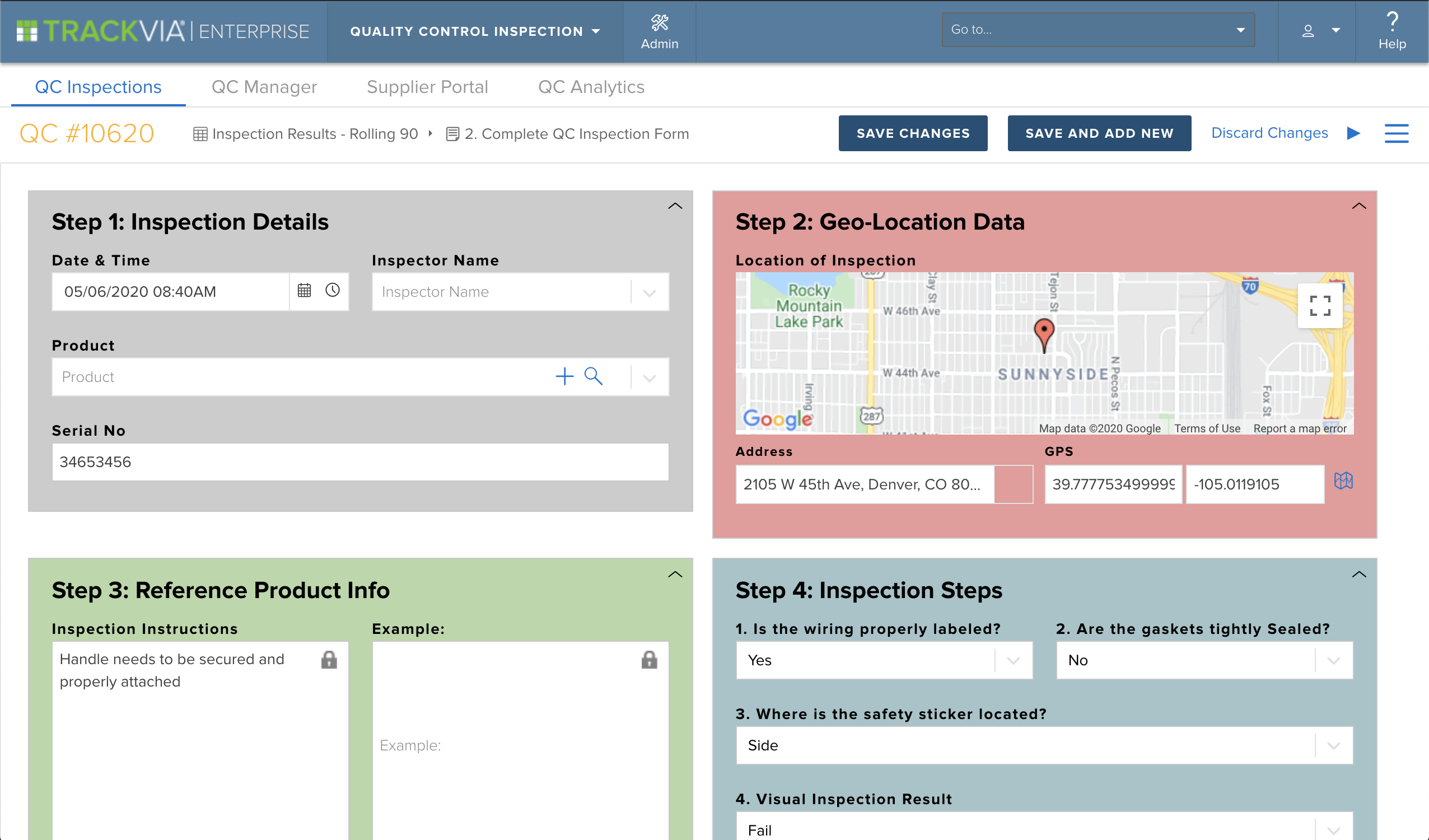
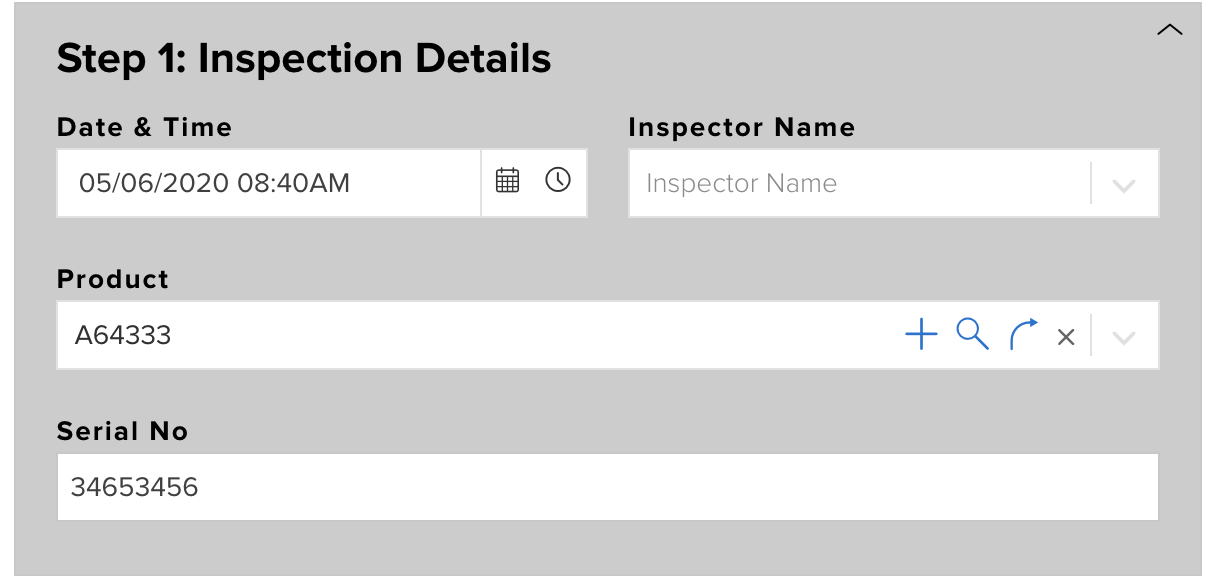
Here is a form with several Link to Parent fields. This form is capturing a quality inspection. There is a relationship between the inspection and the products that are being inspected. You’ll notice that the (Product) LTP field now has a magnifying glass icon on it.
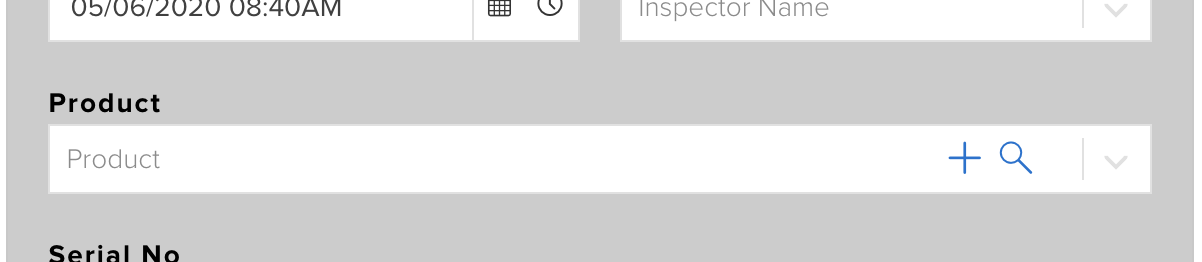
Here is a closeup of the new magnifying glass on the relationship field.
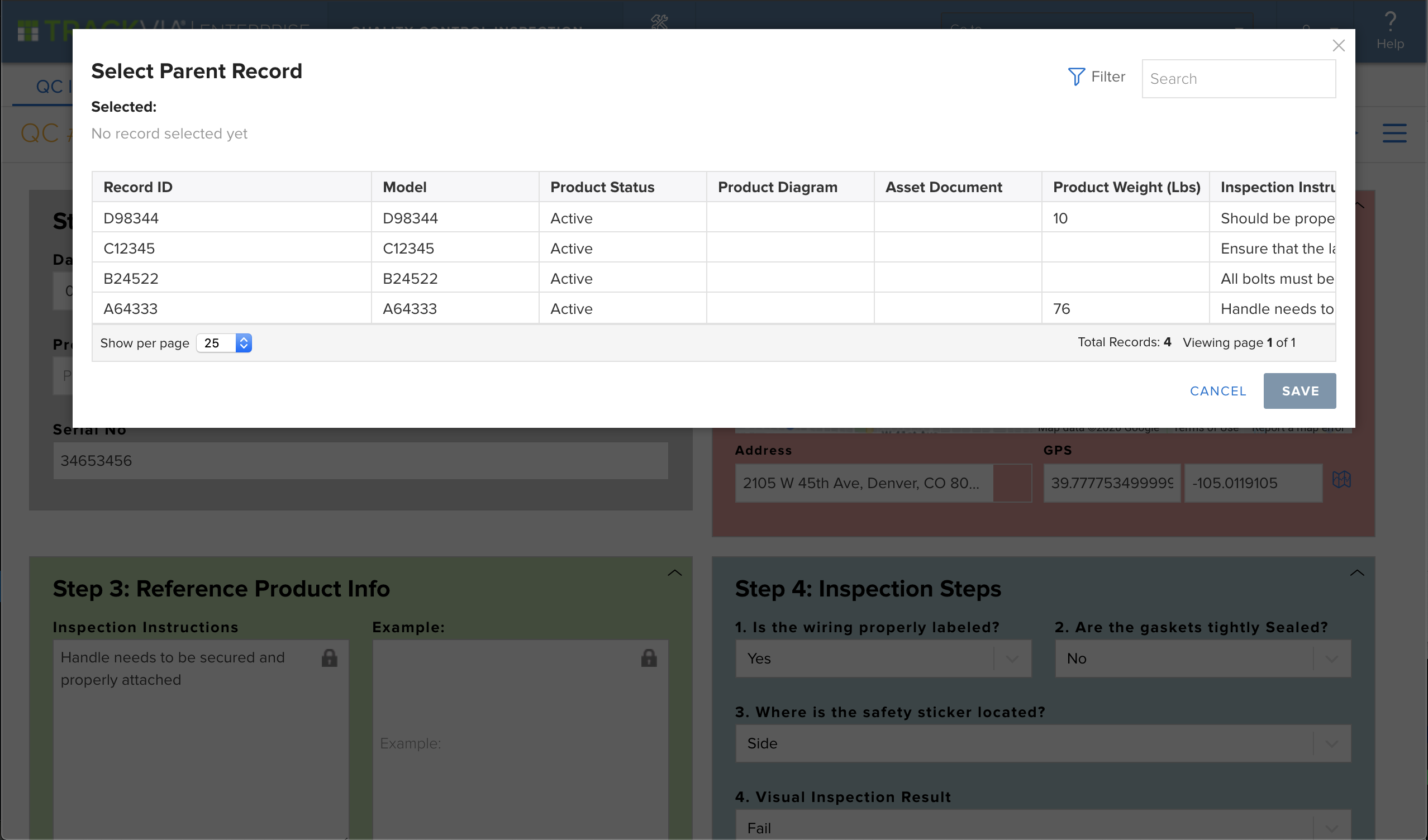
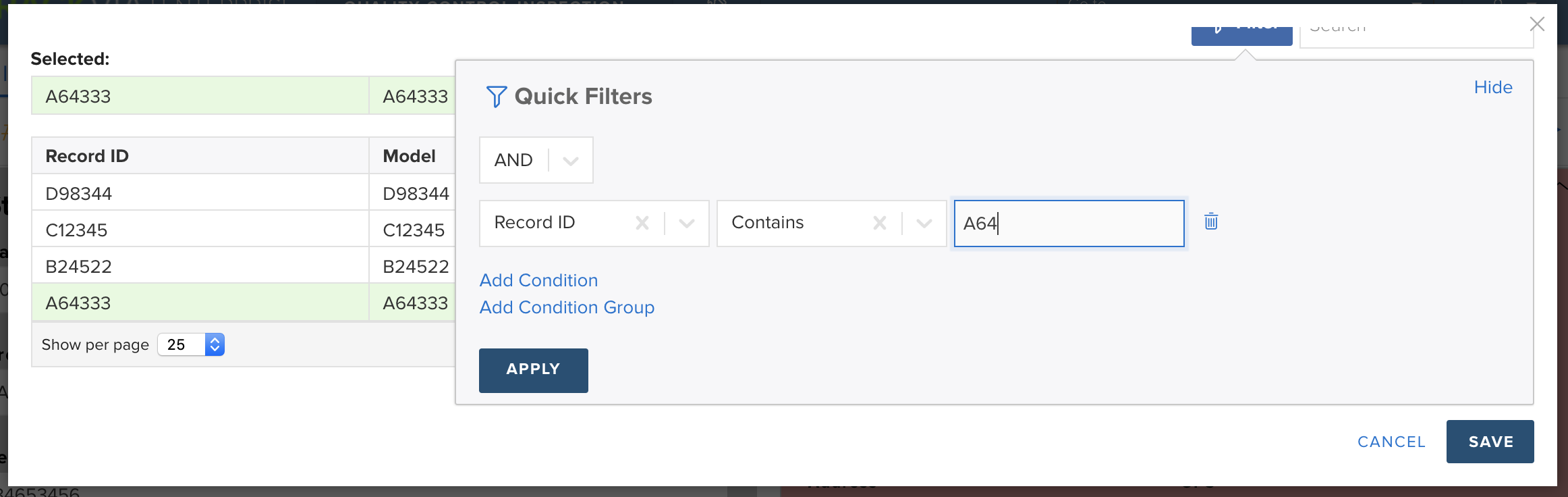
Clicking the magnifying glass will open a window to show you your available options. You can now search or filter your records to find the one you want.
I searched for “A64”, hit enter, and viewed my results!
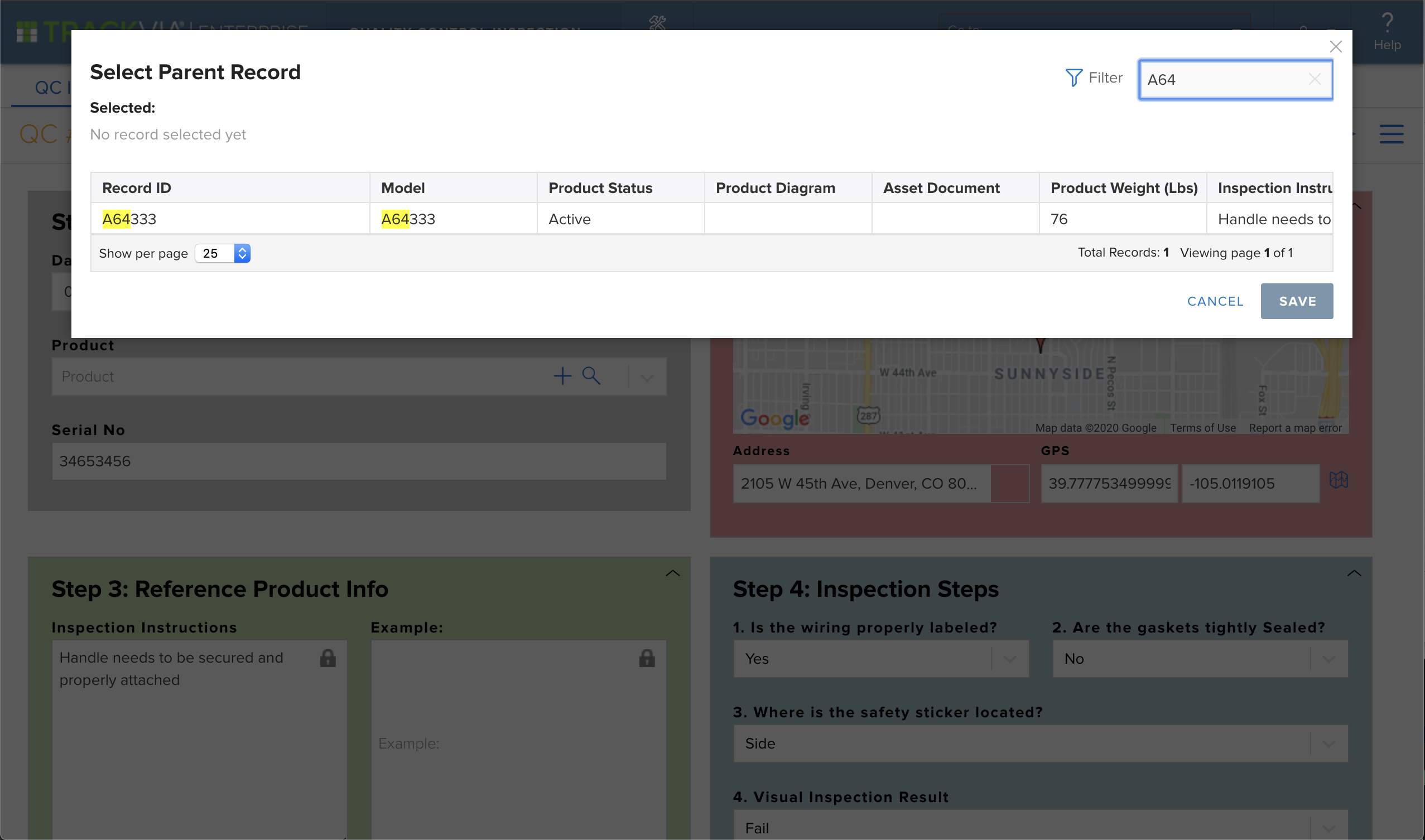
I can then click on the result, hit Save and my selection has been saved to the field.
Filters work just like our Quick filters on views.
This new functionality will help your users easily create and update the data they need too. Let us know how this works for you!
## Related articles
- [How do I create a link-to-parent lookup field?](https://help.trackvia.com/hc/en-us/related/click?data=BAh7CjobZGVzdGluYXRpb25fYXJ0aWNsZV9pZGwrCBvyZ2mhCDoYcmVmZXJyZXJfYXJ0aWNsZV9pZGwrCJvG2yaHBzoLbG9jYWxlSSIKZW4tdXMGOgZFVDoIdXJsSSJTL2hjL2VuLXVzL2FydGljbGVzLzk0ODkzNTExNzY3MzEtSG93LWRvLUktY3JlYXRlLWEtbGluay10by1wYXJlbnQtbG9va3VwLWZpZWxkBjsIVDoJcmFua2kG--8051cc417b84d78feaf6a4a5990cc3b96990eaa5)
- [Retrieve Value from Grand-Parent Table?](https://help.trackvia.com/hc/en-us/related/click?data=BAh7CjobZGVzdGluYXRpb25fYXJ0aWNsZV9pZGwrCJuzV06VCDoYcmVmZXJyZXJfYXJ0aWNsZV9pZGwrCJvG2yaHBzoLbG9jYWxlSSIKZW4tdXMGOgZFVDoIdXJsSSJML2hjL2VuLXVzL2FydGljbGVzLzk0MzczNTc1MTk3NzEtUmV0cmlldmUtVmFsdWUtZnJvbS1HcmFuZC1QYXJlbnQtVGFibGUGOwhUOglyYW5raQc%3D--cf8a86e420b98bf022694f270134e539f4c76282)
- [How To Use Calculated Fields and Formulas](https://help.trackvia.com/hc/en-us/related/click?data=BAh7CjobZGVzdGluYXRpb25fYXJ0aWNsZV9pZGwrCBsbvPr8BzoYcmVmZXJyZXJfYXJ0aWNsZV9pZGwrCJvG2yaHBzoLbG9jYWxlSSIKZW4tdXMGOgZFVDoIdXJsSSJPL2hjL2VuLXVzL2FydGljbGVzLzg3ODMxMTk3ODQ3MzEtSG93LVRvLVVzZS1DYWxjdWxhdGVkLUZpZWxkcy1hbmQtRm9ybXVsYXMGOwhUOglyYW5raQg%3D--bbd02b47e5662c9f9cb459059c4f55eecc1e4406)
- [How to send a attachment form to people outside organization?](https://help.trackvia.com/hc/en-us/related/click?data=BAh7CjobZGVzdGluYXRpb25fYXJ0aWNsZV9pZGwrCJuzfjeVCDoYcmVmZXJyZXJfYXJ0aWNsZV9pZGwrCJvG2yaHBzoLbG9jYWxlSSIKZW4tdXMGOgZFVDoIdXJsSSJiL2hjL2VuLXVzL2FydGljbGVzLzk0MzY5NzQxOTk3MDctSG93LXRvLXNlbmQtYS1hdHRhY2htZW50LWZvcm0tdG8tcGVvcGxlLW91dHNpZGUtb3JnYW5pemF0aW9uBjsIVDoJcmFua2kJ--50fd80b24ec4c6b4df6f88eda18d19e3a24fc1fd)
- [iOS Mobile App v4.4: Locations, Directions, and Maintenance](https://help.trackvia.com/hc/en-us/related/click?data=BAh7CjobZGVzdGluYXRpb25fYXJ0aWNsZV9pZGwrCJtE%2Bld0BzoYcmVmZXJyZXJfYXJ0aWNsZV9pZGwrCJvG2yaHBzoLbG9jYWxlSSIKZW4tdXMGOgZFVDoIdXJsSSJeL2hjL2VuLXVzL2FydGljbGVzLzgxOTYyNzM2MjAxMjMtaU9TLU1vYmlsZS1BcHAtdjQtNC1Mb2NhdGlvbnMtRGlyZWN0aW9ucy1hbmQtTWFpbnRlbmFuY2UGOwhUOglyYW5raQo%3D--214416d268cd5c6cdd4324385784f089167b5ef7)
Article is closed for comments.
[Powered by Zendesk](https://www.zendesk.com/service/help-center/?utm_source=helpcenter&utm_medium=poweredbyzendesk&utm_campaign=text&utm_content=TrackVia)
---
[Skip to main content](https://help.trackvia.com/hc/en-us/articles/9493243200667-After-I-imported-the-first-spreadsheet-I-could-not-figure-out-how-to-import-the-other-3#main-content)
Ben shared this idea · Sep 4, 2013
## Related articles
- [edit the table schema](https://help.trackvia.com/hc/en-us/related/click?data=BAh7CjobZGVzdGluYXRpb25fYXJ0aWNsZV9pZGwrCBv0SFGiCDoYcmVmZXJyZXJfYXJ0aWNsZV9pZGwrCJuEY1GiCDoLbG9jYWxlSSIKZW4tdXMGOgZFVDoIdXJsSSI7L2hjL2VuLXVzL2FydGljbGVzLzk0OTMyNDE0NTk3MzktZWRpdC10aGUtdGFibGUtc2NoZW1hBjsIVDoJcmFua2kG--75e6346731b03562cd633105e16cb15dad36eac2)
- [go to online videos](https://help.trackvia.com/hc/en-us/related/click?data=BAh7CjobZGVzdGluYXRpb25fYXJ0aWNsZV9pZGwrCJt5LFCiCDoYcmVmZXJyZXJfYXJ0aWNsZV9pZGwrCJuEY1GiCDoLbG9jYWxlSSIKZW4tdXMGOgZFVDoIdXJsSSI5L2hjL2VuLXVzL2FydGljbGVzLzk0OTMyMjI4MTYxNTUtZ28tdG8tb25saW5lLXZpZGVvcwY7CFQ6CXJhbmtpBw%3D%3D--71336187044214e181b6cd61aaa85a62b7c80d42)
- [How do I change the name of an App once it is created?](https://help.trackvia.com/hc/en-us/related/click?data=BAh7CjobZGVzdGluYXRpb25fYXJ0aWNsZV9pZGwrCBsV7E2iCDoYcmVmZXJyZXJfYXJ0aWNsZV9pZGwrCJuEY1GiCDoLbG9jYWxlSSIKZW4tdXMGOgZFVDoIdXJsSSJbL2hjL2VuLXVzL2FydGljbGVzLzk0OTMxODUwNDE2OTEtSG93LWRvLUktY2hhbmdlLXRoZS1uYW1lLW9mLWFuLUFwcC1vbmNlLWl0LWlzLWNyZWF0ZWQGOwhUOglyYW5raQg%3D--92c2bff338c152ea9531198e7b3c8b579cefd522)
- [How do you create a form to update records?](https://help.trackvia.com/hc/en-us/related/click?data=BAh7CjobZGVzdGluYXRpb25fYXJ0aWNsZV9pZGwrCJtFi0CiCDoYcmVmZXJyZXJfYXJ0aWNsZV9pZGwrCJuEY1GiCDoLbG9jYWxlSSIKZW4tdXMGOgZFVDoIdXJsSSJQL2hjL2VuLXVzL2FydGljbGVzLzk0OTI5NjA1OTMzMDctSG93LWRvLXlvdS1jcmVhdGUtYS1mb3JtLXRvLXVwZGF0ZS1yZWNvcmRzBjsIVDoJcmFua2kJ--f2a8462f1732dd8b02b8d4ec10e07bb89017dfcf)
- [upload multiple documents to a record?](https://help.trackvia.com/hc/en-us/related/click?data=BAh7CjobZGVzdGluYXRpb25fYXJ0aWNsZV9pZGwrCJuCQwyiCDoYcmVmZXJyZXJfYXJ0aWNsZV9pZGwrCJuEY1GiCDoLbG9jYWxlSSIKZW4tdXMGOgZFVDoIdXJsSSJLL2hjL2VuLXVzL2FydGljbGVzLzk0OTIwODM0NzUwOTktdXBsb2FkLW11bHRpcGxlLWRvY3VtZW50cy10by1hLXJlY29yZAY7CFQ6CXJhbmtpCg%3D%3D--4b13faade4dc0fa4bd2c0b3646f75b2c54b3fc59)
- 
Permanently deleted user
- 2 years ago
TrackVia(Community Manager, TrackVia) commented · September 4, 2013 6:00 PM ·
Hi Ben,
After creating your first table by importing a spreadsheet, you should be taken to the App Overview page. In the top section here, labeled "Tables", there is a green Import button you can click to proceed with additional imports.
Thanks for the question!
Regards,
DJ
0
Please [sign in](https://help.trackvia.com/hc/en-us/signin?return_to=https%3A%2F%2Fhelp.trackvia.com%2Fhc%2Fen-us%2Farticles%2F9493243200667-After-I-imported-the-first-spreadsheet-I-could-not-figure-out-how-to-import-the-other-3) to leave a comment.
[Powered by Zendesk](https://www.zendesk.com/service/help-center/?utm_source=helpcenter&utm_medium=poweredbyzendesk&utm_campaign=text&utm_content=TrackVia)
[iframe](https://td.doubleclick.net/td/ga/rul?tid=G-XMMWW2S2NC&gacid=1647239106.1743443083>m=45je53r0v887411077za200zb9136995142&dma=0&gcd=13l3l3l3l1l1&npa=0&pscdl=noapi&aip=1&fledge=1&frm=0&tag_exp=102482433~102788824~102803279~102813109~102887800~102926062~102975949&z=1370618826)
Permalink
---
[Skip to main content](https://help.trackvia.com/hc/en-us/articles/9493243200667-After-I-imported-the-first-spreadsheet-I-could-not-figure-out-how-to-import-the-other-3?sort_by=created_at#main-content)
Ben shared this idea · Sep 4, 2013
## Related articles
- [edit the table schema](https://help.trackvia.com/hc/en-us/related/click?data=BAh7CjobZGVzdGluYXRpb25fYXJ0aWNsZV9pZGwrCBv0SFGiCDoYcmVmZXJyZXJfYXJ0aWNsZV9pZGwrCJuEY1GiCDoLbG9jYWxlSSIKZW4tdXMGOgZFVDoIdXJsSSI7L2hjL2VuLXVzL2FydGljbGVzLzk0OTMyNDE0NTk3MzktZWRpdC10aGUtdGFibGUtc2NoZW1hBjsIVDoJcmFua2kG--75e6346731b03562cd633105e16cb15dad36eac2)
- [go to online videos](https://help.trackvia.com/hc/en-us/related/click?data=BAh7CjobZGVzdGluYXRpb25fYXJ0aWNsZV9pZGwrCJt5LFCiCDoYcmVmZXJyZXJfYXJ0aWNsZV9pZGwrCJuEY1GiCDoLbG9jYWxlSSIKZW4tdXMGOgZFVDoIdXJsSSI5L2hjL2VuLXVzL2FydGljbGVzLzk0OTMyMjI4MTYxNTUtZ28tdG8tb25saW5lLXZpZGVvcwY7CFQ6CXJhbmtpBw%3D%3D--71336187044214e181b6cd61aaa85a62b7c80d42)
- [How do I change the name of an App once it is created?](https://help.trackvia.com/hc/en-us/related/click?data=BAh7CjobZGVzdGluYXRpb25fYXJ0aWNsZV9pZGwrCBsV7E2iCDoYcmVmZXJyZXJfYXJ0aWNsZV9pZGwrCJuEY1GiCDoLbG9jYWxlSSIKZW4tdXMGOgZFVDoIdXJsSSJbL2hjL2VuLXVzL2FydGljbGVzLzk0OTMxODUwNDE2OTEtSG93LWRvLUktY2hhbmdlLXRoZS1uYW1lLW9mLWFuLUFwcC1vbmNlLWl0LWlzLWNyZWF0ZWQGOwhUOglyYW5raQg%3D--92c2bff338c152ea9531198e7b3c8b579cefd522)
- [How do you create a form to update records?](https://help.trackvia.com/hc/en-us/related/click?data=BAh7CjobZGVzdGluYXRpb25fYXJ0aWNsZV9pZGwrCJtFi0CiCDoYcmVmZXJyZXJfYXJ0aWNsZV9pZGwrCJuEY1GiCDoLbG9jYWxlSSIKZW4tdXMGOgZFVDoIdXJsSSJQL2hjL2VuLXVzL2FydGljbGVzLzk0OTI5NjA1OTMzMDctSG93LWRvLXlvdS1jcmVhdGUtYS1mb3JtLXRvLXVwZGF0ZS1yZWNvcmRzBjsIVDoJcmFua2kJ--f2a8462f1732dd8b02b8d4ec10e07bb89017dfcf)
- [upload multiple documents to a record?](https://help.trackvia.com/hc/en-us/related/click?data=BAh7CjobZGVzdGluYXRpb25fYXJ0aWNsZV9pZGwrCJuCQwyiCDoYcmVmZXJyZXJfYXJ0aWNsZV9pZGwrCJuEY1GiCDoLbG9jYWxlSSIKZW4tdXMGOgZFVDoIdXJsSSJLL2hjL2VuLXVzL2FydGljbGVzLzk0OTIwODM0NzUwOTktdXBsb2FkLW11bHRpcGxlLWRvY3VtZW50cy10by1hLXJlY29yZAY7CFQ6CXJhbmtpCg%3D%3D--4b13faade4dc0fa4bd2c0b3646f75b2c54b3fc59)
- 
Permanently deleted user
- 2 years ago
TrackVia(Community Manager, TrackVia) commented · September 4, 2013 6:00 PM ·
Hi Ben,
After creating your first table by importing a spreadsheet, you should be taken to the App Overview page. In the top section here, labeled "Tables", there is a green Import button you can click to proceed with additional imports.
Thanks for the question!
Regards,
DJ
0
Please [sign in](https://help.trackvia.com/hc/en-us/signin?return_to=https%3A%2F%2Fhelp.trackvia.com%2Fhc%2Fen-us%2Farticles%2F9493243200667-After-I-imported-the-first-spreadsheet-I-could-not-figure-out-how-to-import-the-other-3) to leave a comment.
[Powered by Zendesk](https://www.zendesk.com/service/help-center/?utm_source=helpcenter&utm_medium=poweredbyzendesk&utm_campaign=text&utm_content=TrackVia)
Permalink
---
[Skip to main content](https://help.trackvia.com/hc/en-us/articles/9493243200667-After-I-imported-the-first-spreadsheet-I-could-not-figure-out-how-to-import-the-other-3?sort_by=votes#main-content)
Ben shared this idea · Sep 4, 2013
## Related articles
- [edit the table schema](https://help.trackvia.com/hc/en-us/related/click?data=BAh7CjobZGVzdGluYXRpb25fYXJ0aWNsZV9pZGwrCBv0SFGiCDoYcmVmZXJyZXJfYXJ0aWNsZV9pZGwrCJuEY1GiCDoLbG9jYWxlSSIKZW4tdXMGOgZFVDoIdXJsSSI7L2hjL2VuLXVzL2FydGljbGVzLzk0OTMyNDE0NTk3MzktZWRpdC10aGUtdGFibGUtc2NoZW1hBjsIVDoJcmFua2kG--75e6346731b03562cd633105e16cb15dad36eac2)
- [go to online videos](https://help.trackvia.com/hc/en-us/related/click?data=BAh7CjobZGVzdGluYXRpb25fYXJ0aWNsZV9pZGwrCJt5LFCiCDoYcmVmZXJyZXJfYXJ0aWNsZV9pZGwrCJuEY1GiCDoLbG9jYWxlSSIKZW4tdXMGOgZFVDoIdXJsSSI5L2hjL2VuLXVzL2FydGljbGVzLzk0OTMyMjI4MTYxNTUtZ28tdG8tb25saW5lLXZpZGVvcwY7CFQ6CXJhbmtpBw%3D%3D--71336187044214e181b6cd61aaa85a62b7c80d42)
- [How do I change the name of an App once it is created?](https://help.trackvia.com/hc/en-us/related/click?data=BAh7CjobZGVzdGluYXRpb25fYXJ0aWNsZV9pZGwrCBsV7E2iCDoYcmVmZXJyZXJfYXJ0aWNsZV9pZGwrCJuEY1GiCDoLbG9jYWxlSSIKZW4tdXMGOgZFVDoIdXJsSSJbL2hjL2VuLXVzL2FydGljbGVzLzk0OTMxODUwNDE2OTEtSG93LWRvLUktY2hhbmdlLXRoZS1uYW1lLW9mLWFuLUFwcC1vbmNlLWl0LWlzLWNyZWF0ZWQGOwhUOglyYW5raQg%3D--92c2bff338c152ea9531198e7b3c8b579cefd522)
- [How do you create a form to update records?](https://help.trackvia.com/hc/en-us/related/click?data=BAh7CjobZGVzdGluYXRpb25fYXJ0aWNsZV9pZGwrCJtFi0CiCDoYcmVmZXJyZXJfYXJ0aWNsZV9pZGwrCJuEY1GiCDoLbG9jYWxlSSIKZW4tdXMGOgZFVDoIdXJsSSJQL2hjL2VuLXVzL2FydGljbGVzLzk0OTI5NjA1OTMzMDctSG93LWRvLXlvdS1jcmVhdGUtYS1mb3JtLXRvLXVwZGF0ZS1yZWNvcmRzBjsIVDoJcmFua2kJ--f2a8462f1732dd8b02b8d4ec10e07bb89017dfcf)
- [upload multiple documents to a record?](https://help.trackvia.com/hc/en-us/related/click?data=BAh7CjobZGVzdGluYXRpb25fYXJ0aWNsZV9pZGwrCJuCQwyiCDoYcmVmZXJyZXJfYXJ0aWNsZV9pZGwrCJuEY1GiCDoLbG9jYWxlSSIKZW4tdXMGOgZFVDoIdXJsSSJLL2hjL2VuLXVzL2FydGljbGVzLzk0OTIwODM0NzUwOTktdXBsb2FkLW11bHRpcGxlLWRvY3VtZW50cy10by1hLXJlY29yZAY7CFQ6CXJhbmtpCg%3D%3D--4b13faade4dc0fa4bd2c0b3646f75b2c54b3fc59)
- 
Permanently deleted user
- 2 years ago
TrackVia(Community Manager, TrackVia) commented · September 4, 2013 6:00 PM ·
Hi Ben,
After creating your first table by importing a spreadsheet, you should be taken to the App Overview page. In the top section here, labeled "Tables", there is a green Import button you can click to proceed with additional imports.
Thanks for the question!
Regards,
DJ
0
Please [sign in](https://help.trackvia.com/hc/en-us/signin?return_to=https%3A%2F%2Fhelp.trackvia.com%2Fhc%2Fen-us%2Farticles%2F9493243200667-After-I-imported-the-first-spreadsheet-I-could-not-figure-out-how-to-import-the-other-3) to leave a comment.
[Powered by Zendesk](https://www.zendesk.com/service/help-center/?utm_source=helpcenter&utm_medium=poweredbyzendesk&utm_campaign=text&utm_content=TrackVia)
Permalink
---
[Skip to main content](https://help.trackvia.com/hc/en-us/articles/9489613907867-Allow-calculated-form-fields-value-to-be-selected-copied#main-content)
Unable to select (or copy) values from Calculated Text fields
The html fields used to display these fields are